Roster Management Pickleball: A Guide for Team Captains
Roster Management Pickleball: A Guide for Team Captains
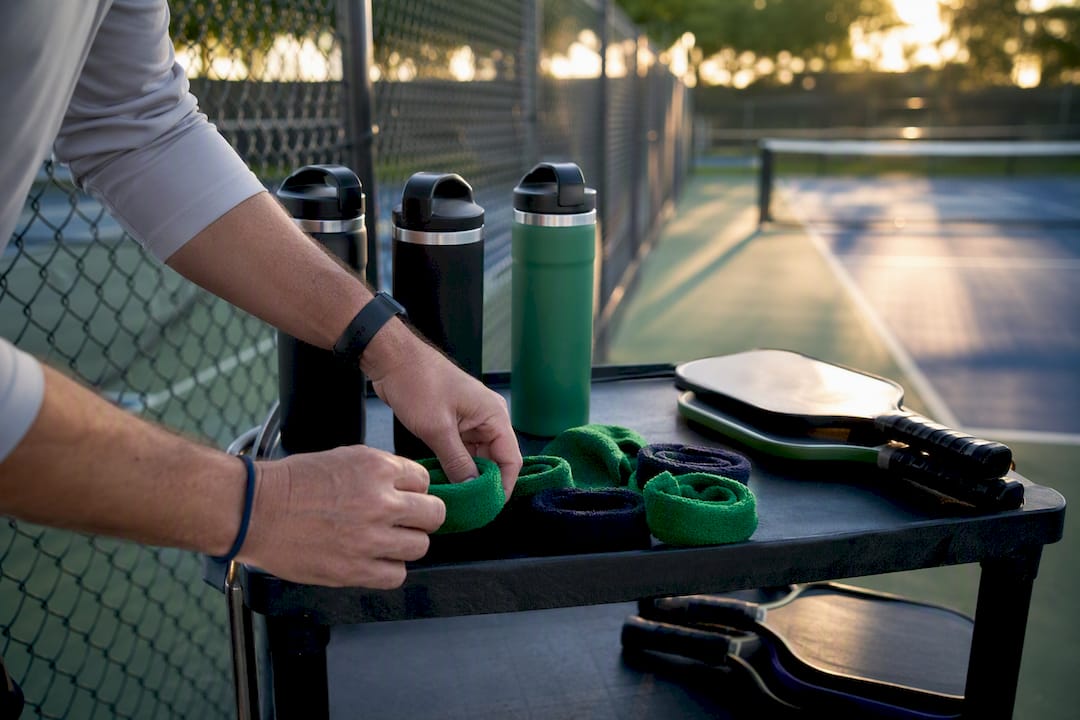
Manage your pickleball roster with a software-first workflow: invite players, verify eligibility, then sort everyone into active or inactive status before you build a single lineup. That sequence prevents the two most common headaches captains report: no-shows on match night and disputes over who was actually eligible to play.
A working roster system needs four pieces:
- A clear invite method (direct invite, invite code, or registration link)
- Eligibility checks tied to skill rating or league rules
- Attendance and availability tracking you can see at a glance
- An audit trail showing who changed the roster and when
If you’re picking a tool right now, look for one with DUPR-rating support and Stripe-based payment collection built in. Those two integrations alone eliminate most of the manual work captains still do by hand.
Key Takeaways
A software-first roster workflow, invite, verify eligibility, then track active and inactive status, cuts forfeits and disputes far more reliably than spreadsheets or group texts.
| Point | Details |
|---|---|
| Use a software-first workflow | Invite, verify eligibility, then assign active or inactive status before building lineups. |
| Match roster size to format | Recreational teams typically run four to eight players; competitive formats often stay leaner. |
| Enforce limits automatically | Let software cap rosters and flag ineligible players instead of relying on manual counts. |
| Archive, never delete | Keep inactive player records for disputes and season-end analytics instead of permanent deletion. |
| Choose a platform with real integrations | FlexLeague+ pairs DUPR-linked eligibility checks with Stripe payment processing in one captain dashboard. |
Table of Contents
- What Is Roster Management in Pickleball?
- How Do You Add Players to a Pickleball Roster?
- Which Features Matter Most in Roster Management Software?
- How Many Players Should Be on a Pickleball Roster?
- How Do You Handle Midseason Roster Changes?
- How FlexLeague+ Supports These Roster Workflows
- How Do You Protect Player Data in a Roster System?
- Connecting Your Roster to Calendars, Rankings, and Tournament Tools
- What Can Roster Data Tell You About Team Performance?
- A Software-First Approach Beats Spreadsheets Every Time
- Run Your League’s Roster the Easy Way
- Where to Learn More
- Frequently Asked Questions
- Sources
What Is Roster Management in Pickleball?
Roster management is the ongoing job of adding, approving, and moving players on a team roster. It’s a distinct task from setting the on-court lineup, which happens match by match and pulls from whoever is active on that roster. A doubles team might carry five rostered players but only two step onto the court per game, so the roster is your bench, not your starting lineup.
League rules and DUPR ratings often set the boundaries captains work within. Most captain dashboards now handle the daily grind in one place: adding and inviting players, generating invite codes, and setting lineups. On a typical week, a captain’s roster tasks look like this:
- Approve or deny new player requests
- Move an injured player to inactive status
- Check a new signup’s eligibility rating
- Update the waitlist order before a spot opens
How Do You Add Players to a Pickleball Roster?
Add players the moment they’re identified, using whichever method matches how they found the team. Waiting until “roster lock” week to process everyone at once is how captains end up scrambling the night before matches start.
1. Direct invite (email or text). Use this for players you already know and want on the team. Send the invite, then confirm they’ve accepted before counting them as rostered. Most platforms flag pending invites separately from confirmed players, so you’re never guessing who’s actually in.
2. Invite codes. Generate a code and hand it to a group, a friend group, or a facility bulletin board. This is the fastest way to fill a roster when you don’t have a specific name in mind yet. Codes expire or get disabled once the roster fills, which stops late strangers from joining after the fact.
3. During registration. Some leagues let players self-register into open team slots. If you run it this way, set an approval step so a captain still signs off before someone’s officially on the books.
4. Free-agent requests. Unattached players who want a team submit a request, and the captain accepts or declines based on open spots and eligibility.
5. Walk-up or late additions. For last-minute fills, add manually and verify eligibility on the spot rather than after the match.
Every method above needs the same verification step behind it: confirm identity, check the DUPR rating or league ranking against your division’s cap, and make sure payment or a waiver is complete before the player is locked in for match night.
For lineup night versus season-long changes, keep the process separate:
- Match night: Confirm active players, submit the lineup, lock it before start time.
- Season roster change: Submit request, get co-captain or admin approval, log the change with a timestamp.
Pro Tip: Set an automated reminder tied to your invite codes so unaccepted invitations expire after 48 hours. It clears dead weight off your pending list and forces a decision before roster day sneaks up on you.
Which Features Matter Most in Roster Management Software?
Prioritize software that turns each manual task into a two-click action. The features below map directly to the workflows captains actually run every week.
- Invite flows (direct, code-based, and registration-linked) save the back-and-forth of texting players individually.
- Active, inactive, and archive states let you bench a player without deleting their history, which matters for stats and disputes.
- Eligibility enforcement checks DUPR ratings or division caps automatically instead of relying on a captain’s memory.
- Lineup submission tools stop the Sunday-night group text scramble.
- Attendance tracking flags chronic no-shows before they cost you a forfeit.
- A mobile app means roster changes happen courtside, not back at a laptop.
- Calendar sync keeps match times off sticky notes and inside everyone’s actual calendar.
- Reporting and export tools turn a season of data into something you can actually use.
- DUPR integration ties ratings directly into eligibility checks.
- Stripe-based payment processing and waivers capture registration fees and legal sign-off in one motion.
Each of these solves a specific cost: wasted admin time, forfeited matches from confusion, missing records during a dispute, or registration fees that never got collected.
Pro Tip: If you can only prioritize three features, pick invite codes, active/inactive states, and DUPR-linked eligibility checks. Those three alone eliminate the majority of the “wait, was this guy even supposed to be here?” conversations captains dread.
How Many Players Should Be on a Pickleball Roster?
Pick a roster size based on your format, not habit. Recreational teams generally do well with four to eight players, and six is a common default because it covers vacations and injuries without turning lineup night into a puzzle. Competitive team formats often run leaner, closer to three to six.

Some leagues enforce hard caps for a reason. Certain intramural doubles divisions limit a team to three total players even though only two take the court at once, which keeps forfeit risk low without bloating the bench. Software should enforce that cap automatically, not rely on a captain counting names.
Match the roster action to the situation:
- Injury: move the player to inactive, pull a bench player up.
- No-show pattern: flag for attendance review, consider a waitlist replacement.
- Late registration: place on waitlist, activate when a confirmed spot opens.
Role-based rules (captain, co-captain, inactive, suspended) should trigger automated eligibility checks so a suspended player can’t accidentally get added to a lineup.
How Do You Handle Midseason Roster Changes?
Route every change through the same approval chain: the captain requests it, a co-captain or league admin signs off, and the system logs the result automatically. Skipping the approval step is how rosters get messy fast.
- Captain submits the change request (add, drop, or move to inactive).
- Co-captain or league admin reviews and approves.
- Platform timestamps the change and records the prior roster state.
Keep the audit trail complete: who made the change, when, and what the roster looked like before. Use inactive or archived states instead of permanent deletion, since a deleted player takes their match history and stats with them, which makes season-end reports and disputes far harder to resolve.
Waitlists usually run on sign-up order, though many captains keep a shortlist of players they’d invite first regardless of queue position.
Pro Tip: Never permanently delete a player record mid-season. Archive it instead. You’ll want that history if a dispute comes up in week nine, and you’ll definitely want it for season-end analytics.
How FlexLeague+ Supports These Roster Workflows
FlexLeague+ builds the exact workflow this guide recommends: invite codes, active and inactive roster states, waitlists, and a change log that tracks every roster edit.
The feature set lines up directly with what’s covered above:
- DUPR integration ties eligibility checks to real ratings
- Stripe handles registration payments and refunds without a separate invoice system
- A captain dashboard covers adding, removing, and reordering players
- Mobile lineup submission works courtside
Getting a team running takes four steps:
- Create the team inside the league
- Set the roster limit for your division
- Send invites or share an invite code
- Collect registration fees through Stripe at signup
Roster and attendance data export to CSV, and match schedules sync to external calendars, so a captain running five teams isn’t juggling five separate systems. The captain dashboard consolidates the workflow into one screen instead of a spreadsheet and three group texts.
How Do You Protect Player Data in a Roster System?
Treat player contact information, payment details, and eligibility records as data you’re responsible for, not just data you’re storing. A roster full of names, phone numbers, and payment history is a liability if it’s handled loosely.
Start with access control. Not every team member needs admin rights to the full roster. Give co-captains edit access to their own team, keep league-wide roster visibility limited to admins, and revoke access immediately when someone steps down from a captain role.
Payment data shouldn’t touch your own systems at all. Routing registration fees through a processor like Stripe means captains and league admins never see or store card numbers directly, which removes a major liability if your own records ever get exposed.
Waivers and emergency contact information deserve the same treatment as payment data. Store them attached to the player’s profile rather than in a shared spreadsheet that gets forwarded around by email, where a copy can end up sitting in someone’s inbox indefinitely.
Finally, set a data retention policy and stick to it. Keep season records for dispute resolution and historical stats, but don’t hang onto sensitive fields (like emergency contacts for players who left the league years ago) longer than necessary. A roster platform that lets you archive players instead of exposing their full profile indefinitely gives you a cleaner way to balance recordkeeping against privacy.
Connecting Your Roster to Calendars, Rankings, and Tournament Tools
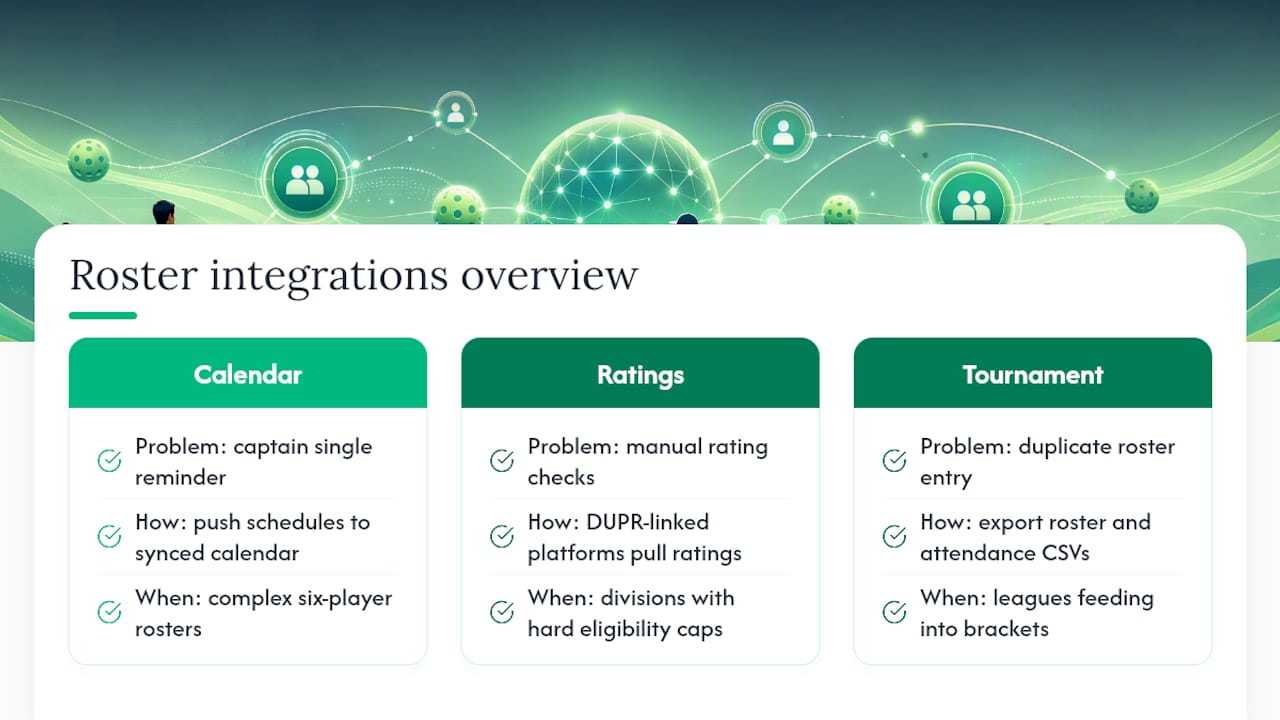
A roster that lives in isolation creates duplicate work. Every time a match gets scheduled, someone has to manually tell players when to show up, and every time a rating changes, someone has to manually check if a player is still eligible for their division.
Calendar sync solves the first problem. When match schedules push directly to a synced calendar, captains stop being the single point of failure for reminding people when to play. This matters more as formats get more complex; Major League Pickleball’s move to six-player rosters in 2026 means more players, more possible lineup combinations, and more schedule coordination than a three-player roster ever required.
Rating integration solves the second. DUPR-linked platforms pull a player’s current rating automatically instead of requiring a captain to check a website and re-enter a number manually. That matters most in divisions with hard eligibility caps, where a player’s rating creeping up mid-season can quietly make them ineligible without anyone noticing until a dispute forces the issue.
Tournament software integration matters for leagues that feed into bracket play. If your league roster and your tournament seeding tool are two separate systems, you’re re-entering the same player list twice and risking a mismatch between who’s rostered and who’s registered for the bracket. A platform that exports clean roster and attendance CSVs makes that handoff a five-minute task instead of an afternoon of copy-paste.
What Can Roster Data Tell You About Team Performance?
Roster and attendance data are only useful once someone actually looks at them. A season’s worth of match results, attendance logs, and lineup combinations holds real answers if you export it and read it with intent.
Attendance patterns are the easiest place to start. If one player has missed six of ten matches, that’s not a scheduling coincidence, it’s a signal to have a conversation before it costs you a forfeit. Reporting tools that flag no-show frequency automatically save a captain from noticing the pattern too late.
Lineup performance data matters even more as roster sizes grow. Roster expansion in pro play, like Major League Pickleball’s shift to six-player squads, is explicitly built around tactical depth and matchup flexibility rather than simply stacking star players. The same logic applies at the recreational and competitive club level: a six-player roster with data on which pairings actually win together beats a roster of six strong individuals thrown together at random. Analysis of the 2026 draft cycle points to the same conclusion, balanced and versatile squads consistently outperform collections of the highest-ranked individual talent.
Export your roster’s match history at season’s end and look for which pairs have the best win rate together, not just which individuals rank highest. That single report often changes how a captain builds next season’s lineup card entirely.
A Software-First Approach Beats Spreadsheets Every Time
Manual roster tracking wastes hours captains don’t have and creates disputes that automated systems simply prevent. Automation, built-in audit trails, and integrations like DUPR and Stripe turn roster management from a chore into a five-minute task. Platforms like FlexLeague+ exist precisely because captains kept solving this same problem with spreadsheets and group texts.
Run Your League’s Roster the Easy Way
If you’ve been managing rosters through spreadsheets, group texts, and a Venmo request for every registration fee, you already know where the cracks show up. FlexLeague+ gives captains and league managers one dashboard for the entire workflow: invite codes, active/inactive roster states, DUPR-linked eligibility checks, and Stripe-based payment collection, all without a subscription fee for players or managers.
It fits leagues running singles, doubles, mixed doubles, or full FLP team formats, and it’s built for the exact roster headaches this guide covers: no-shows, late additions, and disputes over who was actually eligible to play, using recommended paddles like the Pala Pickleball Nox Pro Shot to keep your team equipped. Facility operators and city parks programs use it the same way, collecting registration fees directly through the platform instead of chasing down payments separately.
If you’re ready to stop rebuilding your roster in a spreadsheet every season, set up your first team on FlexLeague+ and send your first round of invite codes today.
Where to Learn More
- Berkeley Recreation & Wellbeing’s intramural pickleball rules
- Pickleball
- World Pickleball Magazine’s analysis of MLP’s 2026 roster rules
- Forbes’ 2026 Major League Pickleball draft preview
- FlexLeague+'s complete guide to pickleball flex leagues
Frequently Asked Questions
What is roster management in pickleball? It’s the process of adding, approving, and tracking players on a team roster, separate from setting the match-night lineup. It includes eligibility checks, attendance tracking, and keeping a record of every roster change.
How many players should be on a pickleball team roster? Recreational teams typically carry four to eight players, with six as a common default. Competitive team formats often run leaner, and some intramural leagues cap doubles rosters at three total players.
What’s the best way to add new players to a roster? Use invite codes for open recruiting, direct invites for players you already know, and free-agent requests for unattached players looking for a team. Verify eligibility and complete payment before locking anyone in.
Should I delete a player from the roster once they leave? No. Move them to an inactive or archived state instead. Permanent deletion erases their match history, which you’ll likely need for season-end stats or a dispute.
Do I need DUPR integration for my league? If your league sets eligibility caps by skill rating, yes. Manual rating checks are slow and easy to miss when a player’s rating changes mid-season.
Sources
- Pickleball Rules - Recreation & Wellbeing
- Pickleball
- MLP’s New Rules May Change Player Value
- Major League Pickleball 2026 draft preview, team needs and draft predictions | Forbes