How to Set the Right Player Cap for Your Pickleball League
How to Set the Right Player Cap for Your Pickleball League

Set your player cap by court capacity, not by how many people want in. Use six players per court as your baseline for rotating formats, then set your per-game-day maximum to courts times that number and flip on a waitlist immediately.
Two numbers to start with:
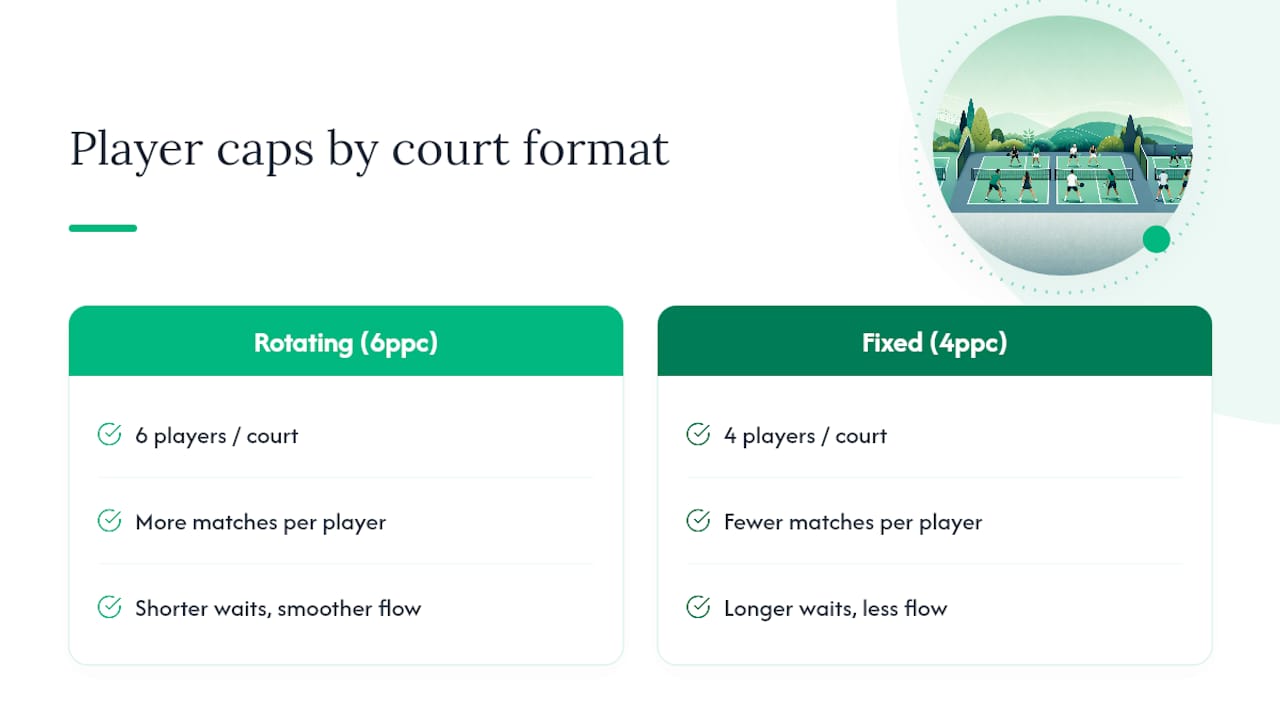
- Rotating doubles with partner switching: 6 players per court
- Fixed open-play doubles: 4 players per court
If you’re running four courts for a rotating format, your session cap is 24. A tool like FlexLeague+ lets you set that number directly in the platform and turn on overflow handling in the same step, so you’re not managing a spreadsheet on the side.
Key Takeaways
The most reliable player cap comes from court capacity, not registration demand, using six players per court for rotating formats and four for fixed open play.
| Point | Details |
|---|---|
| Cap by courts, not demand | Multiply courts by players-per-court to set your session cap before opening registration. |
| Session and season caps differ | Session caps control who plays on a given day; season caps control your total roster. |
| Waitlists prevent overbooking | Enable auto-move with a 24 to 48 hour cutoff so open slots fill without manual outreach. |
| Allocate courts proportionally | Give each division a share of courts matching its share of registered players. |
| FlexLeague+ automates enforcement | Set “Max players for this session,” enable waitlists, and collect fees via Stripe with DUPR-connected score reporting. |
Table of Contents
- Calculating Your Player Cap League Number
- Should Session Caps and Season Caps Match?
- How Should You Handle Waitlists and Overflow?
- How Do You Allocate Courts Across Divisions?
- What’s the Minimum Viable Division Size?
- Three Cap Calculations You Can Copy
- Why Player Caps Are the Most Underrated Lever in League Retention
- Run Your Player Cap League Setup on Autopilot
- Sources
Calculating Your Player Cap League Number
The math is simple, but four inputs decide the outcome: court count, session duration, match format, and how many times a week you run play. Get those right and the cap almost writes itself.
- Count your courts. This is your hard ceiling, not the number of people who emailed asking to join.
- Pick your format. Rotating partners spread players across more matches per hour than fixed pairs, so they tolerate a higher per-court ratio.
- Apply the ratio. Six players per court works well for rotating formats because it keeps a bench of two waiting per court, enough for quick swaps without long sits. Fixed-partner open play runs tighter, with sign-up systems commonly recommending four players per court to avoid overcrowding.
- Multiply. Courts × players-per-court = your cap.
- Stress-test it against session length. A 3-hour block with 6 players per court on rotating format usually yields 3 to 4 matches per player. If your math produces fewer than 2 matches per person, drop the ratio by one.
Worked example: four courts, three-hour session, rotating partners. 4 × 6 = 24 players. That’s your session cap, full stop, before you even open registration.
Should Session Caps and Season Caps Match?
No, and treating them as the same number is one of the most common setup mistakes. A season cap is your total roster, the pool of players who registered for the league. A session cap, sometimes called a per-game-day cap, is how many of them can show up to any single night.
- Season caps run higher because not everyone attends every week.
- Session caps stay pinned to court math, since courts don’t stretch to fit demand.
- A league with a 40-player season roster might still cap each session at 24, because that’s what four courts can absorb.
- Revisit both numbers monthly. If attendance consistently falls under your session cap, you may have room to raise your season roster without touching court allocation.
Confusing these two settings is how leagues end up with players registered but nowhere to play on a given Tuesday.
How Should You Handle Waitlists and Overflow?
Once your session cap fills, the waitlist becomes your traffic cop. Setting “Max players for this session” to match available court space and turning on the waitlist means the system prompts the next eligible player automatically instead of you fielding text messages.
- Set your auto-move cutoff. A 24 to 48 hour window before game day gives you enough runway to fill a cancellation without scrambling same-day.
- Decide priority order. First-come-first-served is simplest; some leagues give season-pass holders priority over drop-ins.
- Handle no-shows with a strike policy. Two no-shows without notice moves a player to the back of future waitlists.
- Template your messages. A confirmation on sign-up, a promotion notice when a slot opens (“You’re in! Court time confirmed for Thursday”), and a heads-up when someone drops.
Pro Tip: Build your waitlist promotion message to include the exact court and time, not just “you’re in.” Confusion about where to show up causes almost as many no-shows as the cap itself.
How Do You Allocate Courts Across Divisions?
Once your total session cap is set, dividing it across multiple divisions, say, men’s doubles, women’s doubles, and mixed, is a separate calculation. Allocate courts proportional to how many players sit in each division, not evenly by default.
- If mixed doubles has 40% of your total registered players, it should get roughly 40% of your court time, not an equal three-way split.
- Rotate prime-time slots across divisions weekly so no group is permanently stuck with the 6 a.m. block.
- Build in a 10 to 15 minute buffer between session blocks. Matches run long more often than they run short.
- For big leagues, partner-rotation algorithms reduce idle time by matching players faster than manual pairing.
A quick allocation matrix helps here: two courts for 16 players splits evenly into two divisions of eight. Four courts for 40 players might mean 12 for women’s doubles, 12 for men’s doubles, and 16 for mixed, based on registration counts. For very large leagues, a 12 week season with rotating partners and weekly sessions might need 8 to 12 courts to serve 200 players, depending on match format and how many matches each player needs per week.
What’s the Minimum Viable Division Size?
Six players can technically run a division, but it’s a fragile setup. Most organizers set 8 to 12 players as the floor for a workable round-robin, with 12 to 16 giving you enough variety that players aren’t facing the same three opponents every week.
- 6 players: works for ladder or flex formats where matchups rotate loosely, but round-robin math gets repetitive fast.
- 8 to 12 players: the sweet spot for a standard round-robin with fixed partners, enough combinations to avoid rematches too often.
- 12 to 16 players: ideal for rotating-partner formats, since more bodies means more partner variety each week.
- Fixed partners need roughly double the individual headcount compared to rotating formats to hit the same match variety.
If you’re short of the minimum, combine adjacent skill divisions temporarily rather than running a division that’s really just three couples facing off in a loop.
Three Cap Calculations You Can Copy
- Small rec center: 2 courts, 2 hour session, fixed open play. Cap = 2 × 4 = 8 players. Tight, but it keeps a short session moving without long sideline waits.
- Medium club night: 4 courts, 3 hour session, rotating partners. Session cap = 4 × 6 = 24 players. Season cap can run to 32 to 36, since not everyone shows up weekly.
- Large multi-division league: 10 courts split across three divisions by registration share. If mixed doubles holds 45% of players, it gets roughly 4 to 5 courts, not an even 3.3 split.
Overbooking beyond court capacity measurably hurts play time and player satisfaction; clubs that cap by courts rather than by demand consistently report better retention. That single design choice, cap to courts, is the difference between a league people renew for and one they quietly abandon after week three.
Why Player Caps Are the Most Underrated Lever in League Retention
Most league managers spend their energy on marketing, trying to fill every open division as fast as possible. That’s backwards. The leagues that keep players coming back season after season are usually the ones that turned people away at the door, because a session that’s capped correctly means shorter waits, more matches per player, and a competitive pool that doesn’t feel diluted.
The mistake I see constantly is managers treating the season roster and the session cap as one number. They open registration, watch it fill, and assume that’s the ceiling. It isn’t. Court capacity is the ceiling. Everything else, waitlists, division splits, auto-move timing, is just traffic management around that fixed constraint. Get the arithmetic right once, and the rest of the season runs on rails instead of your phone.

Run Your Player Cap League Setup on Autopilot
Every rule covered here, court-based session caps, waitlist auto-promotion, proportional division allocation, is a setting inside FlexLeague+, not a manual process you rebuild every season.
The platform lets you create a session, set “Max players for this session” to your calculated cap, enable the waitlist, and configure auto-move timing in a few clicks. Payments run through Stripe, so registration fees get collected automatically instead of chased down over text. Score reporting connects to DUPR, which matters if your players care about their ratings carrying over from league play. Whether you’re running singles, doubles, mixed, or FlexLeague+ team formats similar to MLP, the setup logic stays the same: create session, set cap equal to courts times players-per-court, enable waitlist, open registration.
If you’re still capping registrations by guesswork or a shared spreadsheet, start a league on FlexLeague+ and set your first session cap in minutes.
Sources
- How to Organize a Pickleball League, Tournament, or Open Play | SignupGenius
- Pickleball
- How to Schedule Multi-Division Pickleball Leagues at Scale | MatchGrid Labs
- League setup — creating first league session (support doc)