Pickleball League Registration: Your Step-by-Step Guide
Pickleball League Registration: Your Step-by-Step Guide

Register for a pickleball league by creating an account on the league’s platform, selecting your division or Free Agent option, completing the league registration form, paying the fee through a secure checkout (typically Stripe), and confirming your first game day. That’s the whole loop. Most players complete registration quickly when they have their DUPR rating, contact details, and payment method ready.
Quick checklist before you click Register:
- DUPR rating or self-rating ready (check DUPR’s lookup tool if unsure)
- Email address you’ll use consistently across all league accounts
- Payment method (credit card or ACH)
- Emergency contact name and phone number
- Division preference: singles, men’s doubles, women’s doubles, mixed doubles, or team format
Your next step: search for a league near you or open the registration link your league manager shared. If you don’t have a link yet, the next section shows you exactly where to look.
Key Takeaways
Completing pickleball league registration comes down to four things: having your account, rating, division, and payment ready before the window closes.
| Point | Details |
|---|---|
| Prepare before you click Register | Have your DUPR rating, email, payment method, and emergency contact ready to avoid mid-form drop-off. |
| Use the same email every season | Consistent email prevents duplicate profiles, which leagues can suspend or penalize. |
| Sign up early | Registration windows close on strict dates and popular divisions fill fast; early sign-up improves placement. |
| Opt in after registering | Many leagues require a separate opt-in for each game day after initial registration is complete. |
| Flexleagueplus for organizers | Flexleagueplus handles registration, DUPR integration, Stripe payments, and roster management in one platform. |
Table of Contents
- How do you complete pickleball league registration step by step?
- What information do you need to complete a registration form?
- What do pickleball league fees and deadlines typically look like?
- How do skill ratings and divisions work in pickleball leagues?
- How does Free Agent and team registration work?
- What should you expect from registration platforms and payment security?
- What running leagues taught me about registration friction
- Flexleagueplus makes league registration work the way it should
How do you complete pickleball league registration step by step?
League registration pages commonly include tutorial videos and registrar contact info to help players avoid errors and duplicate accounts. Watch the tutorial first if one is posted. Then follow these steps:
- Pay the registration fee. Most platforms process payment through Stripe. Automating registration and payments reduces drop-off and speeds up completion, which is why embedded checkout has become the standard. Have your card or ACH details ready.
- Opt in for each game day. After registering, many leagues require you to opt in for individual game days within a window set by the manager. Missing the opt-in window can mean sitting out that week.
Before you hit Submit, verify: correct division, correct partner name (if applicable), correct date of birth, and that your payment method has sufficient funds.
Pro Tip: Complete all mandatory fields before touching optional ones. Browsers sometimes time out on long forms, and losing a half-filled form is frustrating. If the platform allows it, save your payment method in your account profile so checkout takes seconds.
What information do you need to complete a registration form?
Registration typically requires contact info, skill level, division choice, and payment. Most league registration forms follow a consistent structure, though competitive or sanctioned leagues may ask for more. Here’s what to have ready:
| Field | Why it’s asked | Tips |
|---|---|---|
| Full name | Roster identification and waiver | Use your legal name; it must match any DUPR profile |
| Email address | Account login and communications | Use the same email every season to avoid duplicate profiles |
| Phone number | Manager contact for game-day updates | A mobile number is preferred |
| Date of birth | Age division eligibility | Required for senior or junior divisions |
| Skill level / DUPR rating | Division placement | Look up your DUPR score before registering |
| Team name or captain | Team registration and roster matching | Captain must register first in most platforms |
| Emergency contact | Safety requirement | Name and phone number of someone not playing |
| Waiver acceptance | Liability and eligibility | Read it; some waivers include rating-honesty clauses |
| Payment details | Fee collection | Credit card or ACH via Stripe |
Some leagues add optional or conditional fields. Competitive divisions may require proof of rating (a screenshot of your DUPR profile works). Medical notes are sometimes requested for players with conditions that affect emergency response. Team captains may need to verify they’ve read roster submission deadlines.
Keep any documents you might need (a DUPR screenshot, a photo ID for age-restricted divisions) saved as a small PDF or image on your phone. Uploading a 10 MB file on a mobile connection is a common cause of form abandonment.
Before you need a paddle for your first match, make sure you have the right gear. The Nox Pro Shot is a solid choice for players entering competitive league play, and the Nox Luxury Tempo suits players who want a lighter touch at the net.

What do pickleball league fees and deadlines typically look like?
Pickleball league fees vary by format, facility, and region. Recreational leagues at municipal parks tend to run on the lower end; club-based and competitive regional leagues cost more because they include court time, staff, and sometimes DUPR reporting fees.
| League type | Typical fee range | What’s usually included |
|---|---|---|
| Municipal / parks & rec | — | Court access, schedule, standings |
| Club recreational league | — | Organized schedule, playoffs, standings |
| Competitive club league | — | DUPR reporting, playoffs, sometimes prizes |
| Regional / sanctioned | — | Sanctioned play, DUPR points, structured brackets |
These ranges reflect common market pricing and will vary by city and facility. Always confirm the exact fee on the league’s registration page before paying.
Registration windows follow a predictable pattern. Most leagues open registration two to four weeks before the season starts and close it a few days before the first game. Some platforms let managers set a hard capacity limit, so a division can fill and close early. Signing up in the first week of an open window almost always gets you better division placement than waiting until the last day.
Refund policies differ widely. The most common rule: full refund if you cancel before the season starts, no refund after the first game day. Some leagues offer a prorated credit if you drop out mid-season due to injury. A few allow you to transfer your registration to another player. Read the refund terms on the registration page before paying, not after.
- Sign up early to avoid waitlists in popular divisions.
- Screenshot your payment confirmation immediately after checkout.
- Note the opt-in deadline for your first game day in your calendar right after registering.
- If a league shows “registration closing soon,” that’s usually accurate.
How do skill ratings and divisions work in pickleball leagues?
Most leagues use one of two systems: DUPR (Dynamic Universal Pickleball Rating) or self-rating. DUPR is an algorithm-based rating that updates after every reported match, giving it more accuracy than a self-assigned number. Some competitive leagues require a verified DUPR score before you can register for certain divisions; recreational leagues typically accept self-ratings on the honor system.
A 3.0-level player can sustain a rally, knows where to stand on the court, and executes basic dinks and groundstrokes with reasonable consistency. Mistakes at 3.0 usually come from poaching at the wrong time, weak third-shot drops, and inconsistent backhand returns. A 3.5 player has most of those fundamentals locked in and starts winning points intentionally rather than waiting for errors.
Leagues use ratings for initial division placement and, in multi-season formats, for promotion and relegation between divisions at the end of each season. Getting placed in the wrong division hurts everyone: a 4.0 player in a 3.0 division dominates without learning anything; a 3.0 player in a 4.0 division gets discouraged fast.
If you’re unsure of your rating:
- Play two or three round-robins at your local club and ask experienced players for honest feedback.
- Look yourself up on the DUPR app if you’ve played in any rated events.
- Ask your club director or league manager for a placement recommendation.
- When in doubt, register one tier lower. You can always move up; getting bumped down mid-season is more disruptive.
Pro Tip: Some leagues run a short placement session in week one before locking divisions. If yours does, show up and play your actual game. Sandbagging a placement session to land in an easier division is the fastest way to get a reputation you don’t want.
How does Free Agent and team registration work?
Registering as a Free Agent
Free Agent registration is for players who want to join a league but don’t have a partner or team yet. You register individually, and the league manager uses your skill rating, availability, and format preference to match you with other Free Agents before the season starts.
What to expect as a Free Agent:
- You may be placed on a waitlist if the Free Agent pool is uneven (more players than available spots in your division).
- Matching usually happens within a week of the registration deadline.
- You might play partial weeks until a full team or partner is confirmed.
- Managers typically contact Free Agents by email, so watch your inbox after the registration window closes.
For singles leagues, Free Agent registration works differently. You register as an individual, and the schedule is built around individual matchups rather than partner pairing. The singles league format has its own registration nuances worth reviewing if that’s your format.
What should you expect from registration platforms and payment security?
A legitimate league registration page has a few things in common. It loads over HTTPS, displays clear refund terms, shows a registrar contact or support link, and sends a confirmation email immediately after payment. If any of those are missing, contact the manager before entering payment details.
Platforms let organizers set booking windows, ticket types, capacities, and custom forms for emergency contacts and waivers. From a player’s perspective, that means you’ll see a structured checkout with defined divisions, a capacity counter, and a form that collects exactly what the manager configured. Event registration tools also support embedded pages and registrant tracking, which is why many leagues embed their registration directly on their club or facility website rather than sending you to a third-party page.
Stripe is the most common payment processor for pickleball league registration fees. It handles card and ACH payments, encrypts transaction data, and sends itemized receipts. When Flexleagueplus processes a registration, Stripe handles the financial layer while the platform manages the league data, DUPR sync, and roster assignment simultaneously.
What a legitimate confirmation email includes:
- League name and season dates
- Your division and format (singles, doubles, team)
- Payment amount and a receipt or invoice number
- Next steps: opt-in instructions, first game day date, manager contact
Security checklist before you pay: HTTPS in the URL bar, a named registrar or support contact, visible refund policy, and a Stripe or equivalent payment badge at checkout. A platform that finalizes its payment gateway before building the registration form avoids the kind of checkout errors that make players abandon mid-registration.
What running leagues taught me about registration friction
The players who breeze through registration are almost never the most tech-savvy. They’re the ones who read the league page before clicking anything. That sounds obvious, but the majority of support emails I see come from players who skipped the instructions and hit a wall at the payment screen or created a second account because they forgot their login.
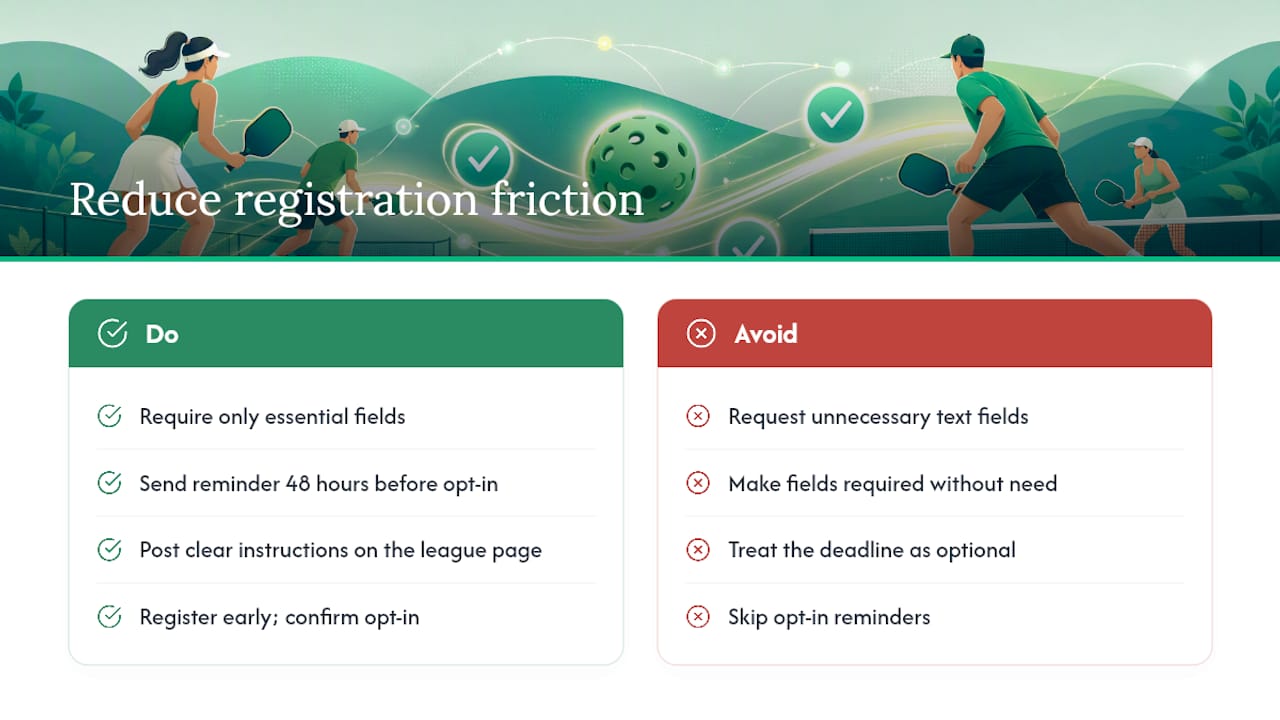
From a manager’s side, the single biggest improvement you can make to your registration process is reducing the number of required fields to the ones you’ll actually use. Every extra field you add drops completion rates. Date of birth matters for age divisions. DUPR matters for placement. Emergency contact matters for safety. A field asking players to describe their “playing style” in a text box? Cut it. Keep the form tight and players finish it.
The other thing managers consistently underestimate is the opt-in window. Players register and assume they’re done. Then they miss the opt-in for week one and think the league forgot them. A single automated reminder email sent 48 hours before the opt-in deadline cuts no-shows dramatically. If your platform doesn’t send that reminder automatically, set a manual calendar alert and send it yourself.
For players: the league registration deadline is not a suggestion. Managers build schedules, set divisions, and confirm court bookings based on registered numbers. Showing up the day before the season starts and asking to be added creates real logistical problems. Sign up when the window opens, confirm your opt-in, and show up ready to play.
Flexleagueplus makes league registration work the way it should
If you’re organizing a pickleball league and still managing registration through spreadsheets, email threads, or a generic form tool, you’re creating problems that don’t need to exist. Flexleagueplus is built specifically for pickleball league management: players register directly through the platform, pay via Stripe, and get placed into divisions with DUPR integration already built in.
The platform supports singles, men’s doubles, women’s doubles, mixed doubles, and FLP team formats. Free Agent matching, roster management, automated scheduling, live standings, and playoff brackets are all included. Because Flexleagueplus is DUPR-approved, competitive leagues can report match results directly without any manual data entry. Stripe handles all payment processing, so registration fees are collected securely and organizers never touch payment data directly.
Players get a clean, mobile-friendly registration experience. Managers get a complete league operation tool with no subscription required. If you want to start a pickleball league or move an existing one onto a platform that handles the full registration-to-playoffs workflow, visit flexleagueplus.com and get your first league set up.