League Email Templates for Organizers: Ready-to-Send Samples
League Email Templates for Organizers: Ready-to-Send Samples

Use these copy-paste league email templates to drop into your platform today and stop rewriting the same messages every season. This guide delivers eight ready-to-send templates with subject lines, short and long body variants, and personalization tokens, plus step-by-step configuration steps for LeagueApps, Golf Genius, and Publicate, and a look at how Flexleagueplus automates the whole sequence.
Here’s exactly what you get:
- Registration confirmation — with payment acknowledgment and next-steps copy
- Draft invite (fantasy leagues) — with draft time, platform link, and urgency line
- Draft reminder — 24-hour nudge with fallback token guidance
- Payment reminder — U.S.-specific Venmo/Zelle/Stripe language
- Schedule change/update — short and long variants with calendar-attach note
- Weekly recap — standings summary and next-game details
- Playoff/standings update — bracket link and urgency copy
- Cancellation/field closed — with reschedule or refund language
Scroll to the templates section to copy any of them. Scroll to the platform configuration section for setup steps in Golf Genius, LeagueApps, and Publicate.
Key Takeaways
Ready-to-use league email templates, paired with one automation rule and a pre-send testing habit, cut the manual communication workload for most league organizers by a significant margin each season.
| Point | Details |
|---|---|
| Copy one template now | Start with the registration confirmation and season-start email — they cover the highest-volume communication moments. |
| Set one automation first | Connect registration to an automatic confirmation send; it’s the single rule that saves the most time. |
| Test on mobile before every send | Check iOS Mail and Android Gmail — most players read league emails on their phones. |
| Use plain text for payments | Plain-text payment reminders render correctly everywhere and rarely hit spam filters. |
| Flexleagueplus automates the sequence | Registration, payment reminders, and schedule updates trigger automatically inside the platform with Stripe and DUPR built in. |
Table of Contents
- League email templates: the full copy-paste library
- How to configure, save, and automate templates in your platform
- What actually improves opens, RSVPs, and on-time payments
- Pre-send testing and preview checklist
- How to adapt templates for fantasy leagues vs. in-person sports leagues
- How Flexleagueplus supports templates and automations for league organizers
- Saving, exporting, and sharing templates: plain text, HTML, and import tips
- What most commissioners get wrong about league emails
- Flexleagueplus handles the templates so you can run the league
- Sources
League email templates: the full copy-paste library
Every template below follows the same structure: subject line options, a short one-paragraph version, a longer logistics version, and personalization tokens. Swap {FIRST_NAME}, {LEAGUE_NAME}, {TEAM_NAME}, {GAME_DATE}, {PAYMENT_LINK}, and {DRAFT_TIME} for your actual values before sending.
A note on payment language: U.S. leagues using Venmo or Zelle should include a one-line disclaimer that personal payment apps may not offer purchase protection. Stripe-based platforms like Flexleagueplus handle this automatically through a checkout link.
Pro Tip: Put a single-line action (“Pay now” or “Confirm your spot”) at the very top of any time-sensitive email. The USSSA League Night Confirmation template does this well — the CTA appears before any logistics copy, which lifts click-through on payment and RSVP emails.
1. Registration confirmation
Subject lines:
- “You’re in, {FIRST_NAME} — {LEAGUE_NAME} registration confirmed”
- “Registration confirmed: {LEAGUE_NAME} starts {GAME_DATE}”
Short version:
Hi {FIRST_NAME}, you’re officially registered for {LEAGUE_NAME}. Your spot is locked in. Check your payment receipt and watch for a schedule email in the next few days. Questions? Reply here.
Long version:
Hi {FIRST_NAME},
Welcome to {LEAGUE_NAME}! Your registration is confirmed and your payment has been received.
League details:
- Start date: {GAME_DATE}
- Location: {VENUE_NAME}, {VENUE_ADDRESS}
- Team/division: {TEAM_NAME}
You’ll receive a full schedule within 48 hours. If you need to make changes to your registration, reply to this email before {DEADLINE_DATE}.
See you on the court. {ORGANIZER_NAME}
Tokens: {FIRST_NAME}, {LEAGUE_NAME}, {GAME_DATE}, {VENUE_NAME}, {TEAM_NAME}, {DEADLINE_DATE}
For subject-line inspiration and additional confirmation formats, Automizy’s registration email guide covers seven confirmation types worth adapting.
2. Draft invite (fantasy leagues)
Subject lines:
- “{LEAGUE_NAME} draft is set — {DRAFT_TIME}”
- “Your {LEAGUE_NAME} draft invite: lock in your slot”
Short version:
Hi {FIRST_NAME}, the {LEAGUE_NAME} draft is happening on {DRAFT_TIME}. Join here: {DRAFT_LINK}. Autopick activates if you’re not online at start time.
Long version:
Hi {FIRST_NAME},
The {LEAGUE_NAME} draft is confirmed. Here’s everything you need:
- Date/time: {DRAFT_TIME}
- Draft room: {DRAFT_LINK}
- Pick order: {PICK_ORDER_NOTE}
- Autopick: Enabled if you miss your window
Log in 10 minutes early to set your queue. Reply with any questions before {DEADLINE_DATE}.
Good luck, {ORGANIZER_NAME}
Tokens: {FIRST_NAME}, {LEAGUE_NAME}, {DRAFT_TIME}, {DRAFT_LINK}, {PICK_ORDER_NOTE}
3. Payment reminder
Subject lines:
- “Payment due: {LEAGUE_NAME} — {DEADLINE_DATE}”
- “{FIRST_NAME}, your {LEAGUE_NAME} balance is outstanding”
Short version:
Hi {FIRST_NAME}, your {LEAGUE_NAME} registration fee of {AMOUNT} is due by {DEADLINE_DATE}. Pay here: {PAYMENT_LINK}. Spots go to the waitlist after the deadline.
Long version:
Hi {FIRST_NAME},
A quick reminder: your {LEAGUE_NAME} registration fee of {AMOUNT} hasn’t been received yet. Your spot is held until {DEADLINE_DATE}.
Payment options:
- Stripe (secure checkout): {PAYMENT_LINK}
- Venmo: @{VENMO_HANDLE} (note: personal payment apps may not offer purchase protection — use at your own discretion)
- Zelle: {ZELLE_EMAIL}
Once payment clears, you’re all set. No action needed after that.
{ORGANIZER_NAME}
Tokens: {FIRST_NAME}, {LEAGUE_NAME}, {AMOUNT}, {DEADLINE_DATE}, {PAYMENT_LINK}, {VENMO_HANDLE}, {ZELLE_EMAIL}
4. Schedule change/update
Subject lines:
- “Schedule update: {LEAGUE_NAME} — {GAME_DATE} changed”
- “{LEAGUE_NAME} game rescheduled — new details inside”
Short version:
Hi {FIRST_NAME}, your {LEAGUE_NAME} game originally scheduled for {OLD_DATE} has moved to {NEW_DATE} at {NEW_TIME}, {VENUE_NAME}. Update your calendar.
Long version:
Hi {FIRST_NAME},
We’ve made a change to the {LEAGUE_NAME} schedule. Here’s what’s different:
- Original date: {OLD_DATE}
- New date: {NEW_DATE} at {NEW_TIME}
- Location: {VENUE_NAME} — {VENUE_ADDRESS}
If this change creates a conflict, reply by {RESPONSE_DEADLINE} and we’ll do our best to accommodate. A calendar invite is attached.
{ORGANIZER_NAME}
For scheduling-related email content and calendar-attach best practices, the Flexleagueplus scheduling guide covers how automated schedule notifications work inside a league platform.
5. Weekly recap
Subject lines:
- “{LEAGUE_NAME} week {WEEK_NUMBER} recap — standings inside”
- “Week {WEEK_NUMBER} results: {LEAGUE_NAME}”
Short version:
Hi {FIRST_NAME}, week {WEEK_NUMBER} is in the books. Check the current standings: {STANDINGS_LINK}. Next game: {GAME_DATE} at {VENUE_NAME}.
Long version:
Hi {FIRST_NAME},
Here’s your {LEAGUE_NAME} week {WEEK_NUMBER} update:
Results: {RESULTS_SUMMARY} Standings: {STANDINGS_LINK} Next game: {GAME_DATE}, {GAME_TIME} at {VENUE_NAME} What to bring: {EQUIPMENT_NOTE}
See you next week. {ORGANIZER_NAME}
6. Playoff/standings update
Subject lines:
- “Playoffs are set — {LEAGUE_NAME} bracket inside”
- “{FIRST_NAME}, your {LEAGUE_NAME} playoff matchup is confirmed”
Short version:
Hi {FIRST_NAME}, the {LEAGUE_NAME} playoff bracket is live. Your first matchup: {MATCHUP_DETAILS}. Full bracket: {BRACKET_LINK}.
Long version:
Hi {FIRST_NAME},
The {LEAGUE_NAME} playoffs are officially set. Here’s where things stand:
- Your seed: {SEED_NUMBER}
- First opponent: {OPPONENT_NAME}
- Game date/time: {GAME_DATE} at {GAME_TIME}
- Location: {VENUE_NAME}
- Full bracket: {BRACKET_LINK}
This is single elimination. Show up ready.
{ORGANIZER_NAME}
7. Cancellation/field closed
Subject lines:
- “{LEAGUE_NAME} game canceled — {GAME_DATE}”
- “Tonight’s {LEAGUE_NAME} game is off — details inside”
Short version:
Hi {FIRST_NAME}, tonight’s {LEAGUE_NAME} game at {VENUE_NAME} is canceled due to {REASON}. We’ll send a reschedule date within 48 hours.
Long version:
Hi {FIRST_NAME},
Unfortunately, the {LEAGUE_NAME} game scheduled for {GAME_DATE} is canceled. Reason: {REASON}.
What happens next:
- Reschedule date: {RESCHEDULE_DATE} (or TBD — we’ll confirm within 48 hours)
- Refund policy: {REFUND_NOTE}
We apologize for the short notice. Reply with questions.
{ORGANIZER_NAME}
8. Season-start “everything you need” email
This one template can replace three or four mid-season informational emails. Send it the week before play begins and treat it as the canonical reference players can search their inbox for all season. The Dev Community sports coordination guide makes the case for exactly this approach: put all logistics in one place and assume players will skim.
Subject line: “{LEAGUE_NAME} season starts {GAME_DATE} — everything you need”
Hi {FIRST_NAME},
{LEAGUE_NAME} kicks off on {GAME_DATE}. Here’s everything in one place:
- Schedule: {SCHEDULE_LINK}
- Location: {VENUE_NAME}, {VENUE_ADDRESS}
- Payment: Confirmed / Due by {DEADLINE_DATE} at {PAYMENT_LINK}
- Rules: {RULES_LINK}
- Contact: {ORGANIZER_EMAIL}
Save this email. It’s your go-to for the season.
{ORGANIZER_NAME}
| Token | What to replace it with |
|---|---|
{FIRST_NAME} |
Player’s first name |
{LEAGUE_NAME} |
Your league’s full name |
{GAME_DATE} |
First game or season start date |
{VENUE_NAME} |
Facility or field name |
{PAYMENT_LINK} |
Stripe checkout URL or Venmo/Zelle info |
{TEAM_NAME} |
Player’s assigned team or division |
{ORGANIZER_NAME} |
Your name or league contact name |
How to configure, save, and automate templates in your platform
Pasting a template into a platform takes about five minutes once you know where to look. The steps below apply to most league management systems, with specific notes on Golf Genius, LeagueApps, and Publicate.
Universal setup checklist
- Create the template. Navigate to your platform’s email or communications section. Look for “Templates,” “Notifications,” or “Automated Emails” in the admin menu.
- Paste your content. Use the plain-text version first. If the editor supports HTML, paste the HTML snippet after confirming the plain-text renders correctly.
- Insert personalization tokens. Most platforms use
{FIRST_NAME}or[[first_name]]syntax. Check your platform’s token library before pasting. - Set reply-to and from name. The from name should read as a person (“Sarah at {LEAGUE_NAME}”), not a generic address. Set reply-to as your actual inbox.
- Add BCC if needed. BCC yourself or a co-organizer on payment reminders and cancellations so you have a send record.
- Save as a draft and send a test. Always test before enabling automation.
- Enable automation trigger. Set the trigger event (registration complete, payment received, X days before game date) and toggle the automation on.
Golf Genius
Golf Genius stores automated email templates inside the admin panel under “Email Templates.” The Golf Genius email template configuration guide walks through editing, resetting to default, and toggling automation on or off. One detail worth noting: the reset button restores the platform’s default copy, so save a copy of your custom text before clicking it.
LeagueApps
LeagueApps exposes notification templates at the program level. Go to your program settings, select “Communications,” and look for the notification type you want to edit (registration confirmation, payment receipt, etc.). You can override the subject line and body for each notification independently. The platform supports basic HTML in the body editor.
Publicate
Publicate is a newsletter-focused editor, so it works best for weekly recaps and playoff announcements rather than transactional confirmations. Build your template in Publicate’s drag-and-drop editor, export as HTML, and paste into your league platform’s HTML email field. RunSignup’s documentation on customizing registration confirmation emails shows how similar platforms handle subject-line overrides and recipient segmentation — useful context if your platform follows the same pattern.
Platform feature comparison

| Editor type | Automation support | HTML allowed | Best for |
|---|---|---|---|
| Rich text (WYSIWYG) | Yes, trigger-based | Sometimes | Transactional confirmations and reminders |
| Drag-and-drop newsletter | Limited or manual | Yes (export) | Weekly recaps, playoff announcements |
| Plain-text only | Manual send | No | Simple reminders, cancellations |
| Full HTML code editor | Yes, API-triggered | Yes | Custom branded templates, advanced flows |
Must-check settings before going live:
- Reply-to address is a real inbox, not a no-reply
- From name reads as a person or league name, not a system string
- Test mode is OFF before the live send
- Audience segment is correct (don’t send a payment reminder to players who already paid)
- Send window respects your players’ timezone (7–9 PM local time tends to work well for recreational leagues)
What actually improves opens, RSVPs, and on-time payments
Most league emails underperform not because the content is bad, but because the subject line is generic and the send time is wrong. Here’s what actually moves the needle.
Subject-line guidelines
Keep subject lines under 50 characters so they don’t truncate on mobile. Start with an action verb or the player’s name. Avoid “FW:” prefixes, all caps, and words like “FREE” or “URGENT” that trigger spam filters.
Six subject lines you can adapt right now:
- “{FIRST_NAME}, your {LEAGUE_NAME} spot is confirmed”
- “Game on: {LEAGUE_NAME} starts {GAME_DATE}”
- “Payment due in 48 hours — {LEAGUE_NAME}”
- “Bracket is live: {LEAGUE_NAME} playoffs”
- “Field closed tonight — {LEAGUE_NAME} update”
- “Week {WEEK_NUMBER} recap: standings and next game”
PosterMyWall reports an average open rate of 34.30% for event schedule emails — a benchmark worth tracking against your own sends.
Timing cheat sheet
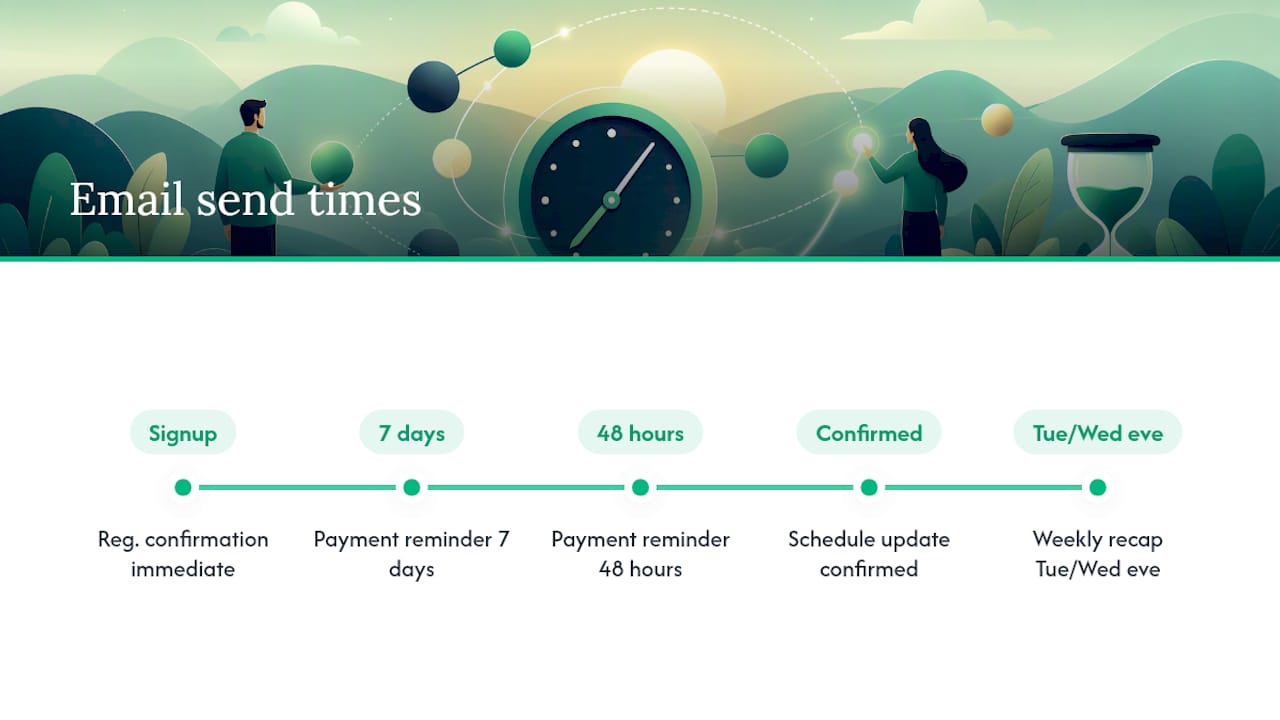
Send registration confirmations immediately on signup (automated). Payment reminders work best 7 days before the deadline, then again 48 hours out. Schedule updates should go out the moment the change is confirmed, never the morning of. Weekly recaps land best Tuesday or Wednesday evening, when players are thinking about the upcoming weekend.
Personalization: what works and what backfires
{FIRST_NAME} in the subject line consistently lifts open rates for community-level leagues. {TEAM_NAME} in the body makes players feel the email is for them specifically, not a mass blast. The pitfall: always set a fallback value. If {FIRST_NAME} fails to populate, the email reads “Hi ,” which kills credibility instantly. Set the fallback to “there” or “league member.”
Pro Tip: For local recreational leagues, a short subject line paired with a recognizable sender name (“Mike from Tuesday Pickleball”) outperforms a longer, polished subject from a generic address. Players open emails from people they recognize, not from “LeagueNotifications@platform.com.”
Pre-send testing and preview checklist
Sending to 80 players with a broken payment link is the kind of mistake that generates 40 reply-all emails. Run through this list before every send.
Device and client testing:
- Send a test to yourself on iOS Mail and Android Gmail
- Open in Outlook (desktop) — table-based layouts often break here
- Check Apple Mail on Mac if your player base skews older
- Verify the email renders in plain text when images are blocked
Content checks:
- Every personalization token populates correctly (no
{FIRST_NAME}showing as literal text) - Every link clicks through to the correct destination
- Payment link opens the correct checkout and shows the right amount
- Calendar attachment opens and shows the correct date, time, and location
- Cancellation emails include a clear next step (reschedule date or refund note)
Spam and deliverability:
- Subject line contains no all-caps words or spam trigger phrases (“FREE,” “ACT NOW,” “WINNER”)
- A plain-text alternative is present alongside any HTML version
- From address matches your sending domain (avoid free Gmail addresses for league-wide sends)
- Unsubscribe link is present for any non-transactional email (weekly recaps, newsletters)
Final go/no-go:
- Audience segment is correct — double-check filters before hitting send
- Send time is scheduled in the correct timezone
- BCC or send-record copy is set for payment and cancellation emails
How to adapt templates for fantasy leagues vs. in-person sports leagues
The templates above work for both, but a few targeted edits make them feel purpose-built rather than generic.
Key differences:
- Tone: Fantasy leagues can be casual and competitive (“Your draft window opens in 3 hours — don’t sleep on it”). In-person sports leagues need logistics-first copy (arrival time, parking, what to bring).
- Urgency triggers: Fantasy urgency is deadline-driven (waiver wire closes, draft starts). In-person urgency is weather and venue-driven (field closures, parking changes).
- Links: Fantasy emails link to live scoring dashboards, draft boards, and waiver pages. In-person emails link to Google Maps, payment checkouts, and schedule PDFs.
- Frequency: Fantasy leagues often need weekly waiver and trade deadline reminders. In-person leagues need fewer emails but more logistical detail per send.
Sample line swaps for a registration confirmation:
| Element | Fantasy version | In-person version |
|---|---|---|
| Opening line | “You’re in — draft day is {DRAFT_TIME}” | “You’re in — first game is {GAME_DATE}” |
| Key detail | “Draft room link: {DRAFT_LINK}” | “Location: {VENUE_NAME}, {VENUE_ADDRESS}” |
| Next step | “Set your pre-draft rankings before {DEADLINE_DATE}” | “Arrive 15 minutes early for warm-up” |
| Footer note | “Autopick activates if you miss your window” | “Bring {EQUIPMENT_NOTE}” |
When to keep everything inside the email vs. linking out:
Keep all details inside the email for cancellations and payment reminders — players shouldn’t have to click anywhere to get the critical information. Link out for standings, brackets, and live scoring, where the data changes and a static email would be outdated within hours.
How Flexleagueplus supports templates and automations for league organizers
Flexleagueplus is built specifically for pickleball league management, and its automation features cover the full template sequence described in this guide.
What the platform handles:
- Automated registration confirmation sent immediately on signup, with no manual trigger needed
- Payment reminder automation tied to Stripe checkout, so the reminder goes out only to players with an outstanding balance
- Schedule and division notifications pushed from the platform’s scheduling engine
- DUPR integration for rating-based division placement, which feeds accurate player data into confirmation and roster emails
- Support for singles, men’s doubles, women’s doubles, mixed doubles, and FLP team formats — each with its own communication flow
Example automation workflow:
- Player registers → Flexleagueplus sends registration confirmation (template) immediately
- Payment not received after 5 days → platform triggers payment reminder (template) with Stripe checkout link
- 7 days before first game → automated week-before reminder (template) with venue and schedule details
- Score reported → standings update sent to division
Pro Tip: Set up your registration confirmation template before you open registration, not after. The first email a player receives sets the tone for the whole season. A clean, specific confirmation with a real reply-to address gets fewer “did my registration go through?” messages than a generic system notification.
Flexleagueplus’s league management blog covers additional workflows for organizers who want to go deeper on scheduling and communication setup.
Saving, exporting, and sharing templates: plain text, HTML, and import tips
When to use plain text vs. HTML
Plain text is the safer default for transactional emails: payment reminders, cancellations, and registration confirmations. It renders correctly in every client, loads instantly on mobile, and rarely triggers spam filters. HTML earns its place in weekly recaps and playoff announcements where a standings table or bracket image adds real value.
Safe HTML patterns for league emails
Keep HTML minimal. A single-column layout with inline styles renders across Gmail, Outlook, and Apple Mail without breaking. Avoid external CSS files — Outlook strips them. Use style="" attributes directly on each element.
A minimal HTML snippet you can adapt:
<!DOCTYPE html>
<html>
<body style="font-family: Arial, sans-serif; max-width: 600px; margin: auto; padding: 20px; color: #222;">
  <h2 style="color: #1a3a5c;">{LEAGUE_NAME} Update</h2>
  <p>Hi {FIRST_NAME},</p>
  <p>{EMAIL_BODY}</p>
  <p style="margin-top: 24px;">
    <a href="{CTA_LINK}" style="background: #2ecc71; color: #fff; padding: 10px 20px; text-decoration: none; border-radius: 4px;">{CTA_TEXT}</a>
  </p>
  <p style="font-size: 12px; color: #888; margin-top: 32px;">You received this because you're registered for {LEAGUE_NAME}. Reply to unsubscribe.</p>
</body>
</html>
Exporting and sharing templates
- Copy the plain-text or HTML version from your editor.
- Paste into a shared Google Doc or Notion page so co-organizers can access and edit it.
- For platform-to-platform transfers, save as a
.txtfile (plain text) or.htmlfile (HTML version). Most league platforms accept a paste from either. - If your platform supports
.emlimport, save the file from your email client’s “Save As” option after sending a test. - Strip any platform-specific token syntax before sharing with a co-organizer on a different system. Replace
[[first_name]]with{FIRST_NAME}as a neutral placeholder.
What to strip when rendering breaks: Remove <style> blocks in the <head>, external font imports (@import), and any class="" attributes. Inline every style. If a table still breaks in Outlook, replace it with a plain bulleted list.
What most commissioners get wrong about league emails
The standard advice is to send more emails and personalize everything. That’s half right. The real problem in most recreational leagues isn’t volume — it’s that organizers send five vague emails when one specific one would do the job.
The season-start email described in this guide is the clearest example. Most commissioners send a welcome note, then a separate schedule email, then a rules reminder, then a payment nudge. Players stop reading by email three. One well-structured email with every detail in a scannable format gets read and saved. Players search their inbox for it all season. That single email does more work than four fragmented ones.
The other underrated move: the reply-to address. Setting it to a real inbox instead of a no-reply address changes how players relate to the league. They ask questions instead of guessing. They flag problems early. The organizer who gets a “wait, where is the field?” reply before game day is better off than the one who gets 15 no-shows because nobody felt comfortable asking.
Template quality matters less than most organizers think. A plain-text email from a name players recognize, sent at the right time, with one clear action at the top, will outperform a beautifully designed HTML newsletter sent from a generic address at 6 AM on a Monday.
Flexleagueplus handles the templates so you can run the league
Running a pickleball league means managing registrations, divisions, schedules, and payments — not rewriting the same emails every week. Flexleagueplus builds the confirmation, reminder, and update sequences directly into the platform, triggered automatically when players register or payments come due through Stripe.
Three things that matter for league organizers:
- Automated confirmations and reminders fire without manual sends — registration triggers the confirmation, outstanding balances trigger the payment reminder
- Stripe-powered payments mean players pay through a secure checkout link, not a Venmo request you have to chase
- DUPR integration keeps player ratings current, so division placements and roster emails reflect accurate data
Start running your league on Flexleagueplus and skip the manual email queue entirely.
Sources
- Email Template Configuration for Automated Emails
- League Night Confirmation – USSSA Email Builder
- 7 Types Of Registration Confirmation Emails And Subject Line Examples
- Customize Registration Confirmation and Other Email Notifications - RunSignup
- Event Schedule Email Template ‘League Tournaments’ for Sports | PosterMyWall
- Sports & Recreation Coordination Email Templates: Team Management, League Communication & Facility Booking - DEV Community