Late Registration Handling for Pickleball League Managers
Late Registration Handling for Pickleball League Managers

Adopt a tiered late-registration policy that ties acceptance to available capacity, requires documented approver sign-off, and collects fees automatically through Stripe before a player is added to any roster. Three things to do today:
- Set tiered fees and hard cutoffs — define what “late” means (after your add window closes) and assign escalating dollar amounts to each tier.
- Require approver sign-off for over-capacity adds — no manager should add a player past the roster limit without a named approval on record.
- Enable automated payments with receipt logging — use Stripe through a platform like Flexleagueplus so every late fee generates a timestamped receipt and an audit trail before the player appears on a schedule.
Key Takeaways
Effective late-registration handling requires a written tiered-fee policy, automated payment collection, documented approvals, and post-season metrics review to keep improving.
| Point | Details |
|---|---|
| Define “late” explicitly | Set a hard cutoff date and time so every request is objectively early or late. |
| Use tiered fees | Escalating fees (e.g., $25 / $50 / $100) deter last-minute sign-ups and cover admin overhead. |
| Require documented approvals | Every late add needs a named approver and a timestamped record before roster placement. |
| Automate payment via Stripe | Confirm payment before adding a player; auto-cancel unpaid requests after 24 hours. |
| Flexleagueplus automates the workflow | Tiered fees, Stripe invoicing, DUPR checks, waitlists, and audit logs are built into the platform. |
Table of Contents
- Why a clear late-registration policy matters for league operations
- What every late-registration policy should include
- Step-by-step workflow for processing late registrations
- Copy-ready templates for policy language, fees, and emails
- Which tools and automations reduce late-registration admin work?
- How to handle edge cases: swaps, transfers, and medical exceptions
- US payment, tax, and recordkeeping best practices for late fees
- How to measure whether your late-registration policy is working
- The part most managers skip
- Flexleagueplus handles late-registration complexity so you don’t have to
- Sources
Why a clear late-registration policy matters for league operations
A clear late-registration policy protects scheduling integrity, competitive balance, and your revenue. Without one, every late request becomes a judgment call, and judgment calls create inconsistency, complaints, and extra admin hours.
The operational risks are concrete:
- Roster imbalances that force a round-robin schedule to be rebuilt mid-season.
- Score-reporting errors when a player appears in the system before their division assignment is confirmed.
- Manual admin time spent chasing payments, tracking approvals in email threads, and updating spreadsheets.
On the fairness side, players who registered on time reasonably expect that late arrivals don’t receive the same terms. Transparent, published rules reduce disputes because players see the policy before they break it. Financially, tiered fees discourage last-minute sign-ups and compensate for the real administrative overhead those requests create.
Pro Tip: Track late-registration volume, admin time, and on-time registration rates for one full season before and after publishing your policy. Share those numbers with your players. Transparency builds trust and tends to push more registrations into the on-time window the following season.
What every late-registration policy should include
Cover five core elements: a clear definition and cutoffs, fee tiers, approval authority, capacity and waitlist rules, and refunds or waivers. Miss any one of them and you will face a situation the policy doesn’t answer.
Definition and cutoffs
“Late” means any registration submitted after your published add window closes. Set an explicit cutoff time, not just a date. “11:59 PM Eastern on the Friday before Week 1” is enforceable. “After registration closes” is not.
Fee tiers
Tiered fees balance deterrence with accessibility. A small early-late fee moves to a larger penalty the longer a player waits. Sample structure (adapt dollar amounts for your market):
| Tier | Window | Example Fee |
|---|---|---|
| Early late | Days 1–3 after cutoff | a small tiered fee |
| Mid late | Days 4 and beyond after cutoff | a moderate tiered fee |
| Very late | Day 5 and beyond | $100 |
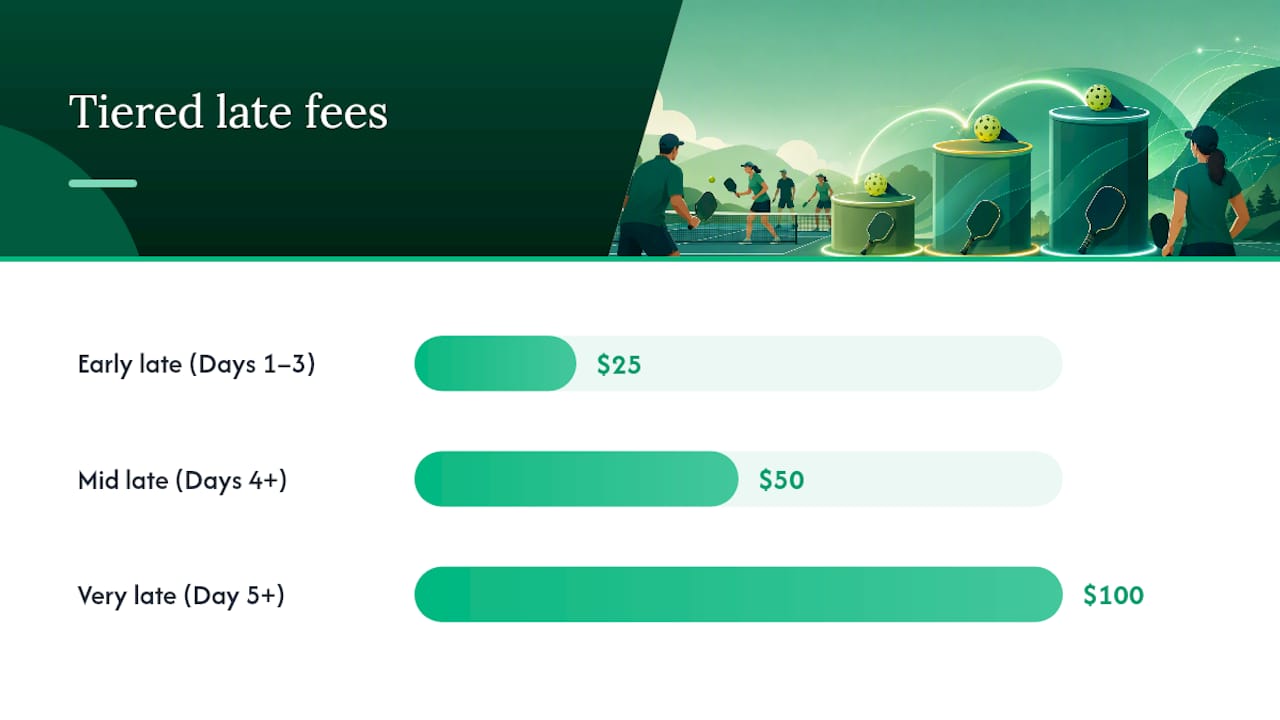
These figures mirror patterns used by institutional registrars. Florida State University applies a flat $100 late fee during short late windows; UT Austin uses $25 and $50 tiers across named registration periods. Both approaches work — the key is publishing the amounts before the season opens.
Approvals, capacity, and waivers
Late adds require manager or director approval, and that approval must be documented. Over-capacity adds need a second sign-off. Waitlist promotion should be automatic once a spot opens, not dependent on someone remembering to send an email.
Refunds are rare. Reserve them for documented administrative errors or medical exceptions, and require written documentation for both. Retroactive enrollment actions carry distinct billing implications — define those in writing before a player asks.
Pro Tip: Build a one-page escalation matrix: Tier 1 cases (standard late fee, capacity available) go to the league manager. Tier 2 cases (over capacity, waiver request) go to the director. This keeps front-line staff from escalating every request.
Step-by-step workflow for processing late registrations
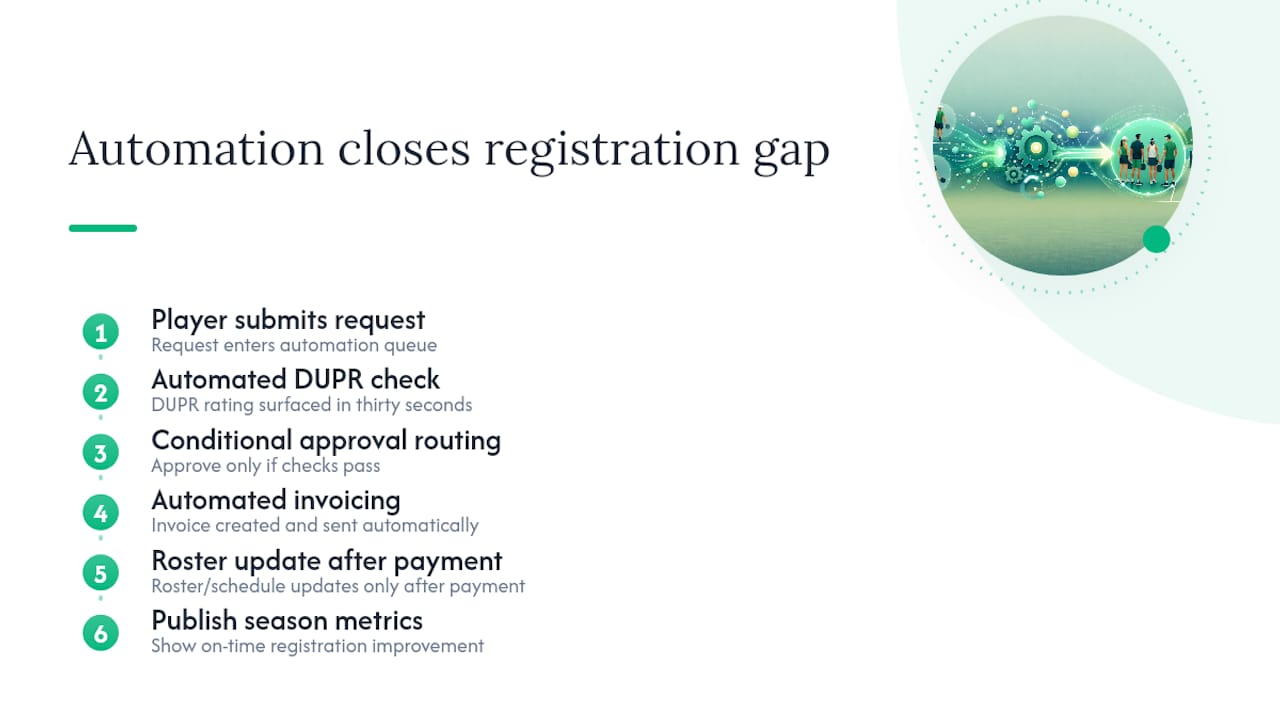
Use a six-step operational workflow so every late registration moves through a predictable, auditable pipeline.
- Receive the request. Capture it on a standard intake form — player name, DUPR ID, division requested, reason for late submission, and payment authorization.
- Verify eligibility. Confirm the player is not already registered, has no outstanding balance, and meets division skill requirements. Cross-check DUPR rating if your league uses it for competitive balance.
- Check capacity. Is the division at or under the roster limit? If yes, proceed. If no, route to the waitlist or escalate for an over-capacity approval.
- Obtain approval. Log the approver’s name, timestamp, and any conditions (fee tier, division placement). No approval, no add.
- Collect payment. Send a Stripe invoice immediately. Mark the registration pending until Stripe confirms payment. Auto-cancel unpaid requests after 24 hours so they don’t hold roster spots.
- Add to roster and log. Place the player in the schedule, update standings, and record the full transaction in your audit log: who approved, what was charged, any waivers granted.
For scheduling adjustments, a dedicated scheduling app can regenerate round-robin draws automatically when a new player is added, which cuts the manual rebuild time significantly.
Copy-ready templates for policy language, fees, and emails
Short, copy-ready templates reduce inconsistency across staff and seasons. Mark every variable in brackets so your team adapts them each season without rewriting from scratch.
Sample policy snippet:
Sample fee tier table (adapt amounts for your league):
Email templates:
- Acceptance: “Your late registration for [LEAGUE NAME] has been approved. Payment of $[AMOUNT] was received on [DATE]. You have been added to [DIVISION]. Your first match is [DATE/TIME/LOCATION].”
- Denial: “Your late registration request for [LEAGUE NAME] could not be approved at this time due to [REASON: capacity/cutoff passed/missing documentation]. You have been placed on the waitlist at position [#]. We will notify you if a spot opens.”
- Waitlist promotion: “A spot has opened in [DIVISION]. You have 48 hours to complete payment of $[AMOUNT] to confirm your place. If payment is not received by [DEADLINE], the spot will move to the next player on the waitlist.”
Intake form required fields: player full name, contact email, DUPR ID (if applicable), division requested, reason for late submission, payment authorization checkbox, approver field, waiver checkbox, and timestamped consent.
Which tools and automations reduce late-registration admin work?
Automate fee collection, approvals, and roster updates using your league platform plus Stripe and DUPR integrations. Manual processes fail at scale and create the exact audit gaps that cause disputes.
Feature checklist for your league software:
- Automated fee tiers that apply the correct charge based on submission date.
- Conditional approval workflows that route over-capacity requests to a second approver.
- Waitlist automation that promotes players and sends payment links without staff intervention.
- Stripe webhooks that mark a registration confirmed only after payment clears.
- Audit logs with timestamps, approver names, and fee amounts for every transaction.
- Receipt generation sent automatically to the player and stored in the platform.
For ACH and card payment processing, embedding fee logic directly in Stripe invoices eliminates manual collection and reduces reconciliation errors at season end.
Pro Tip: Set an auto-cancel rule: if a Stripe invoice for a late registration goes unpaid for 24 hours, the system automatically cancels the pending add and notifies the next waitlist player. This prevents roster spots from sitting in limbo.
How to handle edge cases: swaps, transfers, and medical exceptions
Use a rules-based decision tree for exceptions so handling is consistent and defensible, regardless of which staff member receives the request.
Common scenarios and recommended outcomes:
- Team swaps: Allow with 48-hour advance notice, written approval from both team captains, and a DUPR balance check. No fee if initiated before the mid-late window.
- Retroactive adds: Deny unless the cause is a documented administrative error on the league’s part. Retroactive actions carry distinct billing and scheduling implications.
- Transfers from another division: Require roster balance review and DUPR rating check. Charge the applicable late fee if the transfer occurs after the add window.
- Medical exceptions: Require written documentation (a note from a healthcare provider is sufficient). Approve a full or partial refund based on timing and the league’s published waiver policy.
- No-shows: No refund if the player was confirmed and paid. Credit toward the next season is an option at the director’s discretion, documented in writing.
Decision sequence for any exception: check eligibility → check capacity → check competitive balance (DUPR) → confirm documentation → log outcome.
Pro Tip: Keep a single exceptions log and review it at the end of each season. If the same scenario appears three or more times, it belongs in the written policy, not the exceptions log.
US payment, tax, and recordkeeping best practices for late fees
Treat late fees as taxable revenue where applicable, record every payment with a receipt, and retain an auditable ledger. Late fees collected through a league platform are income, and the IRS expects records to match.
Key practices:
- Require payment at the moment of acceptance — not after the player’s first match.
- Use Stripe for automated receipts; avoid cash collections, which create reconciliation gaps and no paper trail.
- Retain season-level revenue records, including late fees collected, waivers granted, and refunds issued, for at least three years.
- Consult a tax advisor about whether your state or municipality applies sales or amusement tax to registration fees. Rules vary by state.
- Keep a single-source ledger (your league platform’s payment dashboard) and reconcile it against Stripe payouts at the end of each season.
Unpaid registrations that go to collections create reputational and administrative costs that far exceed the original fee. A detailed registration handbook from UCCS illustrates the downstream consequences of unclear billing rules, including monthly service charges and collection referrals. Set clear payment timing expectations in writing before the season opens.
How to measure whether your late-registration policy is working
Track late-signup rate, revenue from late fees, roster-impact incidents, and average admin time per late request. Without these numbers, you are guessing whether the policy is doing its job.
Metrics to monitor:
- % of registrations that arrive late — your baseline and the primary indicator of policy deterrence.
- Average lead time for late adds — how far past the cutoff players are submitting.
- Number of schedule adjustments caused by late adds — direct measure of operational disruption.
- Revenue from late fees — season-over-season comparison shows whether fee levels are appropriate.
- Refund and waiver rate — a high rate signals the policy may be too strict or exceptions criteria are unclear.
Check these weekly during open registration windows, monthly in-season, and run a full post-season review before setting the next season’s cutoffs. If late-signup rate is rising, raise the fee or tighten the cutoff. If schedule adjustments are frequent, consider closing the add window earlier. Data drives better policy.
The part most managers skip
Most late-registration guides stop at “publish a policy and charge a fee.” That’s necessary but not sufficient. The real leverage is in the automation layer — specifically, what happens between the moment a player submits a late request and the moment they appear on a schedule.
If that gap is filled with email threads, manual Venmo requests, and a spreadsheet someone updates when they remember, the policy exists on paper but not in practice. The managers who handle late sign-ups without disruption are the ones who have closed that gap with automated invoicing, conditional approval routing, and roster updates that trigger only after payment confirms.
DUPR integration matters here more than people expect. A late add who bumps a division’s average rating by half a point can affect competitive balance for the entire season. Checking that number before approving the add takes thirty seconds in a platform that surfaces it automatically. It takes a phone call and a spreadsheet lookup if it doesn’t.
Publish your metrics at the end of the season. Players respond to data. Showing that on-time registration improved by a measurable amount after the policy launched is more persuasive than any reminder email.
Flexleagueplus handles late-registration complexity so you don’t have to
Running a pickleball league with a manual late-registration process means chasing payments, rebuilding schedules, and hoping approvals don’t fall through the cracks. Flexleagueplus closes that gap.
The platform supports tiered fee structures, Stripe-powered invoicing with webhook confirmation, conditional approval workflows, automated waitlist promotion, and DUPR player matching — all in one place. Every late registration generates a timestamped audit log. Every payment triggers an automatic receipt. Over-capacity requests route to a second approver without a single email.
For managers running singles leagues, mixed doubles, or FLP team formats, Flexleagueplus handles the registration-to-roster pipeline end to end. Visit Flexleagueplus to see the full feature set and get your league set up.
Sources
Links below provide operational and policy templates you can adapt for your league’s late-registration procedures.
- Late Registration | Penn State Office of the University Registrar
- Late Adds & Late Registration | OUR
- Late & Retroactive Actions | Office of the Registrar | University of Colorado Boulder
- Florida State University Summer/Fall 2026 Registration Guide
- When to register and pay | Summer 2026 | Office of the Registrar