Launch a Corporate Pickleball League in an Afternoon: Stripe, DUPR
Launch a Corporate Pickleball League in an Afternoon: Stripe, DUPR
The fastest way to launch a corporate pickleball league is to build it inside league-management software rather than a spreadsheet: create the league record, open a session with fees connected to Stripe, and switch on DUPR tracking before you publish. A platform like FlexLeague+ handles registration, automated scheduling, and score reporting in one place, which is the difference between running a league and babysitting one. If you have court time and a rough headcount, you can be live within an afternoon.
TL;DR:
- Using dedicated league-management software like FlexLeague+ streamlines registration, scheduling, score reporting, and payments, reducing setup time to under an hour.
- Properly configuring core settings such as fees, DUPR policies, court capacity, and waivers before launch prevents last-minute changes and administrative chaos.
- Charging per session with connected Stripe payments, upfront registration deadlines, and collecting relevant player data ensure a smooth season with predictable revenue.
- Scheduling game days with appropriate groups, seeding styles, and timely finals enhances fairness, engagement, and reduces last-minute complications.
- Promoting the league through visible internal channels, early adopter testimonials, and public standings boosts participation and maintains long-term player interest.
Table of Contents
- Quick-Start Checklist For A Corporate Pickleball League
- How To Set Up A Corporate Pickleball League Step By Step
- Setting Fees, Waivers, And Stripe Payments Correctly
- Running Game Days: Scheduling, Groups, And Scoring
- Keeping Players Engaged Season After Season
- What A First Season Actually Costs
- Fixing The Problems Every Organizer Runs Into
- Rules That Fit A Corporate Pickleball League
- Insurance And Liability For Workplace Pickleball
- Getting People In The Office To Actually Show Up
- Author Perspective: What Actually Saves You Time
- Why FlexLeague+ Fits A Corporate Pickleball League
- Sources
Quick-Start Checklist For A Corporate Pickleball League
Before you open registration, confirm the basics so you’re not fixing settings mid-launch.
- Court capacity and dates: lock in how many courts you have and for how many weeks, since your session length and group sizes flow from this number.
- Format: decide between singles, men’s doubles, women’s doubles, mixed doubles, or a flex/team structure similar to MLP.
- Fees and payments: set your registration price and connect Stripe so money lands in your account automatically.
- DUPR policy: decide whether games count toward players’ ratings and whether a linked DUPR account is required to register.
- Managers and channels: name who runs game days and where players get updates, Slack, Teams, email, or all three.
- Waiver and refund policy: write this down before day one, not after your first cancellation request.
Skip any of these and you’ll end up rebuilding settings after players have already signed up, which is far messier than doing it right the first time.
How To Set Up A Corporate Pickleball League Step By Step
Setting up a league inside a management platform follows a predictable sequence, and most organizers can finish it in under an hour once they know the order.
- Create your organizer profile and league. Most platforms require an active organizer account before you can create a league. This is where you’re told to reuse the same league across seasons instead of building a new one each time, which preserves player history and standings.
- Fill in the basics. Add your league title, format, visibility (public or invite-only for employees), and a contact person for questions.
- Build your first session. This is where the real configuration happens: fee plan, visible and current status, whether games count toward DUPR ratings, sign-up and payment type, and max players per session.
- Add game days. Set the day of the week, start date, number of weeks, opt-in window, and waitlist rules so late signups don’t overload courts you’ve already filled.
- Assign managers and run a test registration. Add anyone helping run the league, then walk through the sign-up and payment flow yourself before real players see it.
Pro Tip: Run a $1 test registration through your own Stripe account before opening real sign-ups. Catching a broken payment link during a test costs you nothing; catching it after 40 employees try to register costs you a flood of confused emails.
Following this order, based on the organizer’s guide to running a league, avoids the most common setup mistake: configuring game days before the session’s fee and player settings, which forces you to redo the schedule anyway.
Setting Fees, Waivers, And Stripe Payments Correctly
How you charge players shapes how smoothly the season runs, so decide this early rather than patching it later.
Most corporate leagues charge per session rather than per game, since it simplifies bookkeeping and gives you predictable revenue to cover court time. Some organizers add a lower rate for returning players or a slight discount for employees registering as a group, which encourages department-wide sign-ups.
- Connect Stripe first, test second. Link your Stripe account, then run a real test transaction. Testing your full payment flow before launch prevents the awkward scenario of a player’s card failing on registration day with no one available to troubleshoot it.
- Set a clear registration deadline. Early-bird pricing for the first week or two boosts early sign-ups and gives you a real headcount sooner.
- Collect the fields you’ll actually need. Department, skill level or self-rating, and DUPR ID if you’re using ratings, all at registration, not after the season starts.
- Publish your refund policy up front. A simple rule works: full refund before the season starts, prorated refund through week two, no refund after that except for injury, verified in writing.
- Plan for chargebacks. They’re rare but happen; keep registration records so you can respond to a Stripe dispute with proof of the player’s sign-up and attendance.
Running Game Days: Scheduling, Groups, And Scoring
Session settings determine how fair and fun each game day feels, and small choices here matter more than most first-time organizers expect.
- Group size: pick a primary group size (commonly 4 to 16 players per pod) and a fallback size for weeks when attendance dips.
- Seeding style: ladder format rewards consistent competitors and works well for skill-based leagues; scramble seeding mixes players randomly each week and fits workplace leagues where cross-department mingling matters more than rankings; tiered brackets suit larger groups with a wide skill range.
- Opt-in and waitlist timing: close opt-in windows early enough that waitlisted players have time to actually show up, and keep max players locked to your real court count.
- Score logging: enter scores the same night if possible. If you’re using DUPR, make sure games are flagged to count toward ratings so updates post automatically instead of requiring manual entry later.
- Finals day: schedule your playoff or finals session a week before the last regular game day so you have buffer time if courts get rained out or double-booked.
Keeping Players Engaged Season After Season
A league with strong scores but weak communication still loses players by week six. The fix is a repeatable message cadence, not more emails.
Send a welcome message the day registration closes, a reminder 24 hours before each session, and a schedule email showing that week’s matchups. After every game day, post standings and a quick highlight, a big win, a surprise upset, whatever gets shared in the office chat. Posting standings publicly does real work here: it turns casual players into regulars because nobody wants to be the person who disappeared from the leaderboard.
- Mix channels: email for official updates, SMS or platform texts for day-of reminders, Slack or Teams for the social chatter that keeps people invested.
- Open next-season registration before the current one ends, and give returning players early access or a small discount.
- Host a short beginner clinic or social night around the midpoint of the season to fold newer players in before they quietly drop out.
Pro Tip: If engagement dips in weeks four or five, that’s often when it’s worth swapping formats, moving from ladder to scramble seeding, for one week. It resets the competitive dynamic and tends to pull lapsed players back.
What A First Season Actually Costs
Budget realistically and you’ll set fees that cover expenses without overcharging employees for a lunch-hour hobby.
A basic first season, according to cost breakdowns from workplace league organizers, typically runs $300 to $600 total: court setup around $100 to $200, loaner paddles $80 to $200, balls $30 to $60, and an optional beginner clinic instructor at $150 to $400. Platform fees are usually separate and scale with registration volume.
- Set your per-player fee to cover total costs divided by expected sign-ups, plus a small cushion for end-of-season awards.
- Budget your own time honestly: 3 to 5 hours a week is realistic for a small league, covering scheduling, score entry, and answering the inevitable “can I switch weeks” messages.
- Delegate at least one task, score entry or communications, to a co-manager so the whole load doesn’t sit on one person.
- Keep a basic equipment checklist: nets or portable posts if courts aren’t dedicated, a ball supply per session, and a first-aid kit at the venue.
Fixing The Problems Every Organizer Runs Into
Most corporate league headaches trace back to one of five recurring issues, and each has a fast fix.
- Silence breeds no-shows. Automate reminders and post-session summaries so players always know what’s next without asking you directly.
- Competitiveness gets personal. Relaxed rules and cross-department pairings keep the tone social instead of tense, which matters more in an office league than a club one.
- Organizers underestimate their own time. Set a weekly admin budget upfront and hand off at least one recurring task before burnout sets in.
- Waitlists spiral out of control. Match your max-player setting exactly to court capacity and turn on auto-move so waitlisted players slide in automatically when spots open.
- Payment flow breaks on day one. A single test registration before launch catches nearly every issue a live player would otherwise hit first.
Rules That Fit A Corporate Pickleball League
Standard pickleball rules (serve diagonally, two-bounce rule, no volleying in the kitchen) still apply, but a workplace league needs a few added layers most public leagues skip.
Set a clear code of conduct that separates competitive intensity from workplace behavior. This matters more than it sounds: a heated line call between two coworkers can carry into Monday’s staff meeting in a way it never would in a public rec league. Many corporate organizers add an explicit rule capping how loudly disputes can escalate and defaulting to a rally-score replay when calls are genuinely unclear.

Eligibility rules deserve their own line item too. Decide upfront whether the league is open only to full-time employees, or extended to contractors, spouses, and remote staff visiting for an event. If you’re running divisions by skill level, define how self-rated players get slotted, many workplace leagues default new players into a middle tier and adjust after two or three games rather than trusting a self-assessment.
If you’re using DUPR, decide whether it’s mandatory or optional. Requiring a linked DUPR account at registration makes rating-based seeding possible, but it can also discourage first-time players who’ve never touched a paddle. A common middle ground: make DUPR optional in the first season, then require it once the league has enough returning players to justify skill-based divisions.
Finally, set a substitution policy. Corporate schedules shift constantly, so allowing a registered player to swap in a same-department colleague for a missed week (with organizer approval) keeps courts full without opening the door to outside players slipping in unregistered.
Insurance And Liability For Workplace Pickleball
Pickleball carries real injury risk, rolled ankles, collisions at the net, the occasional face-first dive for a drop shot, and a workplace league adds a layer most public rec leagues don’t have to think about: the overlap between an employee benefit and company liability.
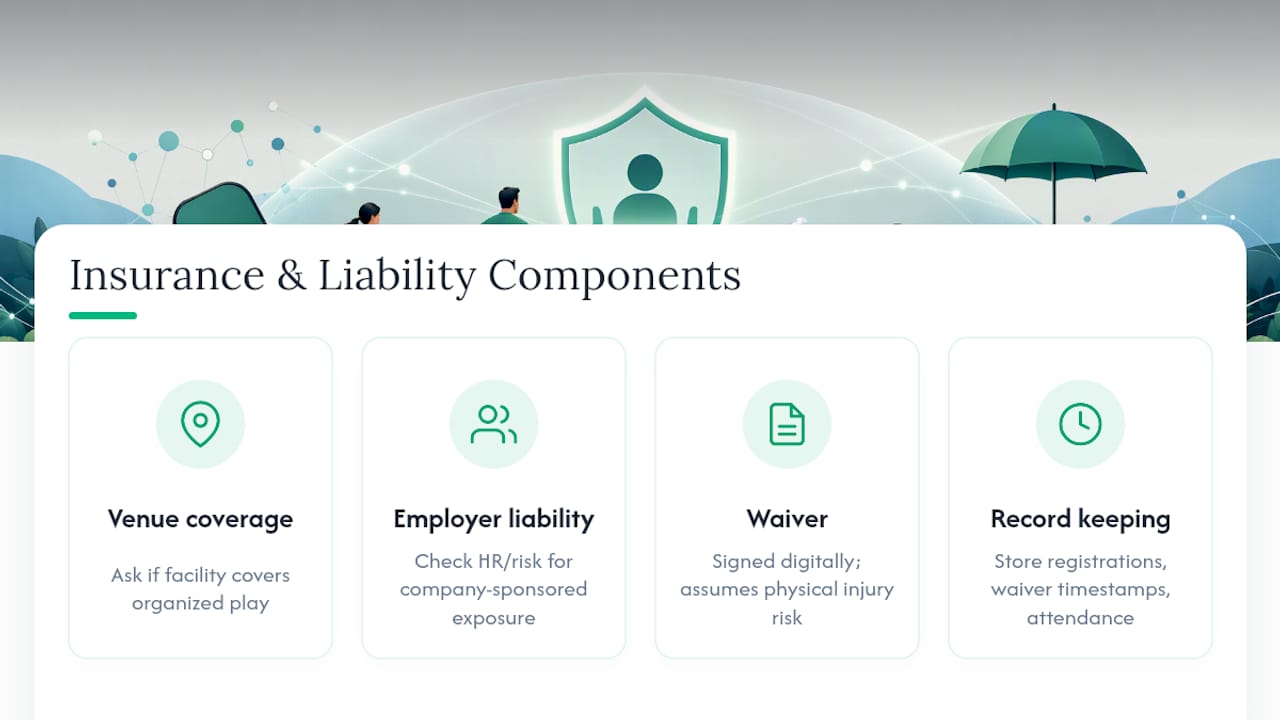
Start with the venue. If you’re renting court time at a public facility, ask directly whether the facility’s insurance covers organized play or only walk-in use; many facilities require organizers to carry a separate certificate of insurance naming the venue. If you’re using an employer’s own courts, check with your company’s HR or risk management team before you publish a single game day; a league that looks like a company-sponsored activity can create liability exposure that a casual lunchtime hit-around wouldn’t.
A signed waiver at registration is non-negotiable, and it should be collected digitally at sign-up rather than chased down on paper later. The waiver should cover assumption of risk for physical injury, not just a generic terms-of-service checkbox. If your company frames the league as an official wellness program, loop in whoever manages your existing corporate wellness programs; some employers already carry policies that extend to organized recreational activities, which can simplify this step considerably.
Keep records. If a dispute ever comes up, having registration data, waiver timestamps, and attendance logs in one platform makes it far easier to answer questions than trying to reconstruct a season from group chat screenshots.
Getting People In The Office To Actually Show Up
A well-built league still fails if nobody outside your immediate circle knows it exists. Marketing a corporate pickleball league is less about ads and more about making it visible in the places employees already look.
Start with a short announcement through whatever internal channel gets read, an all-hands email, a Slack or Teams post, or a flyer near the break room. Include the essentials: format, cost, dates, and a direct registration link, so nobody has to hunt you down to ask basic questions. Framing the league as part of your company’s networking or wellness efforts tends to pull in people who wouldn’t otherwise sign up for “another sports thing,” since office pickleball tournaments work well as a low-stakes way for departments that rarely interact to actually talk to each other.
Recruiting a few visible early adopters helps more than any flyer. If a couple of well-known employees, ideally not just the office’s obvious athletes, sign up publicly first, it signals the league is social rather than intimidating. Once the season starts, let the standings do some of the marketing for you: a public leaderboard posted somewhere visible tends to pull in curious coworkers who weren’t planning to join.
Consider timing your launch around a slower stretch on the corporate calendar, right after a big project wraps or heading into a season with fewer travel conflicts, so participation isn’t competing with deadline crunches. And if you want outside momentum, tools built for organizer communication, like Roster, can help you manage RSVPs and reminders if your league spans multiple offices or a hybrid workforce.
Author Perspective: What Actually Saves You Time
The single habit that saves the most time isn’t a scheduling trick, it’s refusing to manage the league from three different apps. Every organizer who tries spreadsheets plus a group chat plus a separate payment link ends up reconciling all three by hand every week. Consistent communication matters more than clever formats; a league that hears from its organizer on a predictable schedule outlasts one with a fancier bracket but silent Mondays.
Author bio placeholder.
Case study links placeholder.
— Robert
Why FlexLeague+ Fits A Corporate Pickleball League
Running a workplace league without dedicated software means stitching together spreadsheets, a group chat, and a separate payment app, and that patchwork is exactly what breaks down by week five. FlexLeague+ replaces that stack with one system: create your league and sessions, connect Stripe for registration fees, sync DUPR ratings, and let automated scheduling handle game days and score reporting.
For organizers, that means less time chasing payments and more time actually running the league; standings update automatically, players see their own schedule without asking you, and refunds or waitlist moves happen inside the same platform instead of a dozen side conversations. If you’re planning a first season or trying to fix a league that’s already outgrown a spreadsheet, take a look at FlexLeague+'s league management features and set up your first session this week.