How to Collect League Fees for Pickleball Organizers
How to Collect League Fees for Pickleball Organizers

The simplest reliable way to collect league fees is to require a deposit at registration and collect the remaining balance through a PCI-compliant online payment workflow backed by Stripe, integrated directly into your league management system. For pickleball leagues, that means a DUPR-enabled platform handles both the player record and the payment in one step, so you never chase a check or reconcile a Venmo screenshot at midnight.
Here is what to do today:
- Set your fee amount before opening registration (see the formula below).
- Enable a deposit requirement in your platform so no one joins without paying something.
- Configure Stripe as your processor and test the checkout flow with a dummy payment.
- Publish your refund and cancellation policy at signup, not after.
- Turn on automated reminders for the balance due date.
Pro Tip: Tie schedule visibility to payment milestones. Release the first week of games only after a deposit clears, and publish the full schedule once the balance is paid. Players who want their court time will pay on time.
Key Takeaways
The most reliable way to collect league fees is to require a deposit at registration, process payments through a PCI-compliant Stripe integration, publish your policy upfront, and automate every reminder and receipt.
| Point | Details |
|---|---|
| Require a deposit at signup | A deposit filters uncommitted players and secures cash flow before costs hit. |
| Use a PCI-compliant processor | Stripe handles card data security so organizers never store sensitive payment information. |
| Show transparent fee line items | Players pay faster when they see exactly what each dollar covers, not just a total. |
| Automate reminders and receipts | Automated follow-ups eliminate manual chasing and create a paper trail for disputes. |
| Flexleagueplus for pickleball | Stripe integration, DUPR approval, and schedule-release controls in one platform. |
Table of Contents
- How do you calculate a fair league fee?
- Which payment methods work best for U.S. leagues?
- How to set up your online registration and payment workflow
- What should your payment policy actually say?
- Bookkeeping, reconciliation, and tax basics for U.S. leagues
- How to explain fees so players actually pay on time
- Security and PCI compliance: what every organizer needs to know
- How to handle failed payments, no-shows, and partial signups
- What running leagues actually teaches you
- Flexleagueplus makes it easier to collect and manage league fees
- Sources
How do you calculate a fair league fee?
Start with this formula: (fixed costs + variable costs + contingency + admin) ÷ committed players = per-player fee.
Fixed costs are the same regardless of headcount: court or facility rental, league insurance, and any affiliation fees. Variable costs shift with participation: balls, replacement equipment, referee pay, and any per-player platform fees.
Worked example, small league (8 teams, 16 players):
Round to $60 per player. The extra $5.62 per head builds your reserve.
Worked example, larger league (20 teams, 40 players):
Same structure, but court rental scales to $1,200, insurance to $120, equipment to $120, and admin to $80. Total: roughly $1,650. Per player: $41.25, rounded to $45.
Pro Tip: Show players both a per-player and per-team breakdown in your registration announcement. “Your $60 covers 8 weeks of court time, balls, and insurance” answers the question before anyone asks it. Transparent fee breakdowns are the single most effective way to get timely payment.
Which payment methods work best for U.S. leagues?
Every method has a hidden cost, whether that is time, fees, or risk. Personal Venmo and PayPal accounts violate those platforms’ terms of service for business collections and can result in frozen funds mid-season.
| Method | Pros | Cons | Best For |
|---|---|---|---|
| Credit/debit card (Stripe) | Fast, auto-receipts, PCI-compliant | around 3% per transaction | Most leagues |
| ACH bank transfer | Low fees, good for large amounts | 1–3 day settlement, some friction | Larger leagues |
| Zelle | Instant, no fees | No buyer protection, hard to reconcile | Small volunteer leagues only |
| Check/cash | No processing fee | Manual tracking, reconciliation burden | Avoid for 10+ players |
Recommendation: Default to online card payments via Stripe for leagues under 30 players. Add ACH as an option for larger leagues or facilities collecting $100+ per player. Avoid cash and checks unless your league is genuinely tiny and volunteer-run.
How to set up your online registration and payment workflow
Follow this checklist before opening registration:
- Set your fee and deposit amount. A deposit of a substantial portion of the total fee filters uncommitted players and secures early cash flow.
- Configure your payment processor. Connect Stripe in your league management platform. For pickleball leagues, Flexleagueplus connects Stripe natively, so no third-party bridge is needed.
- Enable DUPR integration if your league tracks ratings. Players link their DUPR profile at registration, and their payment status ties to their roster slot.
- Require terms acceptance at checkout. No payment goes through without the player confirming the refund and cancellation policy.
- Run a test transaction. Use a real card with a $1 charge, confirm the receipt fires automatically, then refund it. Do this before you go live.
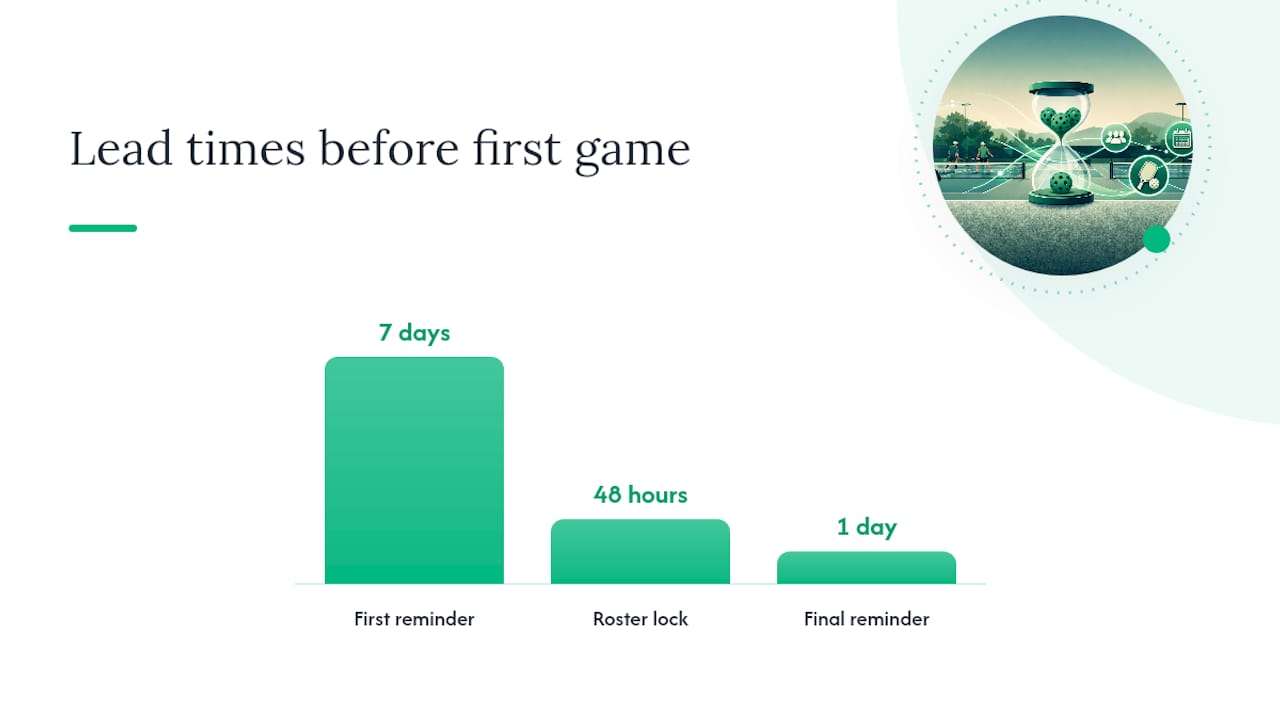
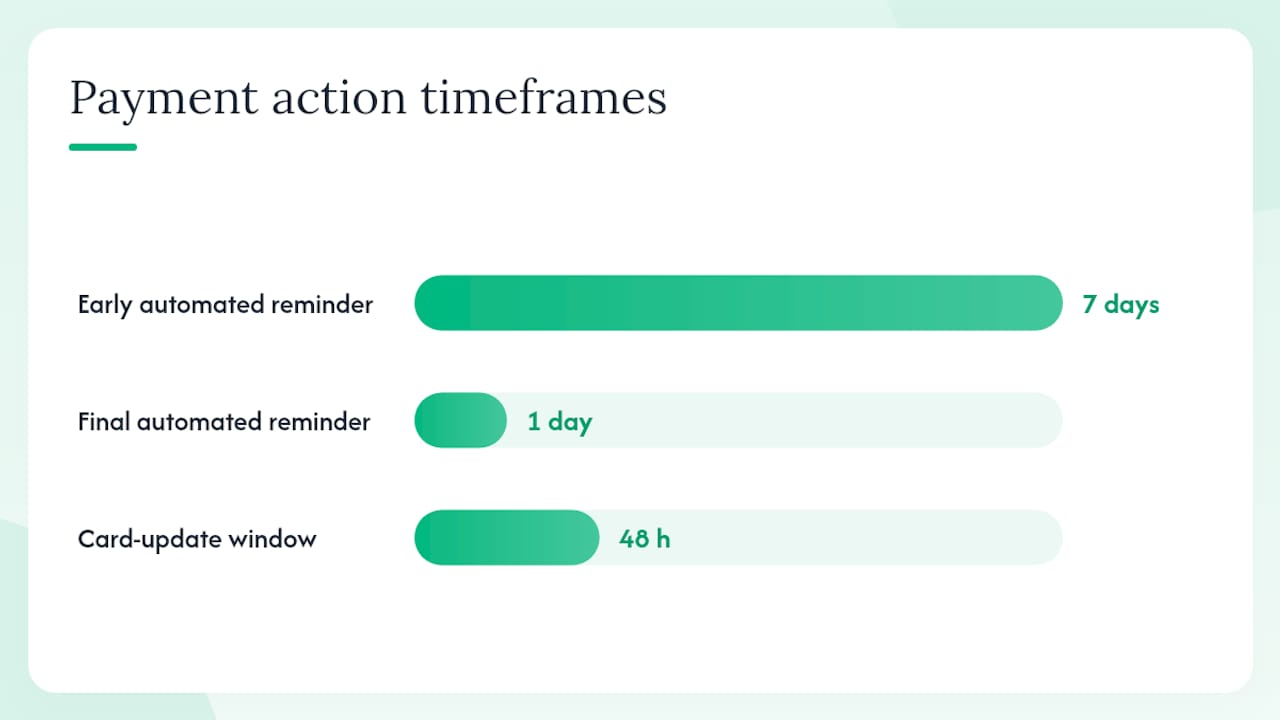
- Enable automated reminders for the balance due date. Set at least two: one week out and one day out.
- Lock the roster for unpaid entries 48 hours before the first game.
Pro Tip: After your test transaction, also test the refund workflow. Knowing exactly how a refund processes before a player asks for one saves a lot of stress.
What should your payment policy actually say?
Here is a framework you can adapt:
- Deposit: 50% due at registration. No roster spot is held without a deposit.
- Balance due date: Full payment required 7 days before the first game.
- Refunds: Full refund minus the deposit if canceled 14+ days before the season starts. No refund within 7 days of the first game.
- Cancellations: If the league cancels, full refunds are issued within 5 business days.
- Late fees: $10 added to balances unpaid after the due date.
For exceptions like financial hardship or scholarship requests, handle them privately and consistently. Keep a written record of every exception you grant.
Communicate the policy in your registration announcement, in the payment confirmation email, and again in the balance-due reminder. Three touches is not overkill.
- Registration announcement: include the full policy link.
- Deposit confirmation email: summarize key dates.
- Balance reminder: restate the due date and late-fee trigger.
Bookkeeping, reconciliation, and tax basics for U.S. leagues
Keep a dedicated account for league funds. Mixing league income with personal accounts creates reconciliation headaches and, for incorporated clubs, potential legal exposure. Platforms that hold and disburse league funds remove the need for any one volunteer to act as banker, which also reduces disputes over who holds the money.
Reconciliation checklist (run after each registration window):
- Match bank deposits against your processor’s payout report.
- Confirm every registered player has a corresponding payment record.
- Log refunds as separate line items, not as negative revenue.
- Export your payment report and file it with your season records.
Tax basics: Registration income is generally treated as club income. If your league is unincorporated, it may flow through to the organizer’s personal return. If you collect more than $600 from a single contractor (referees, for example), you may need to issue a 1099-NEC. When in doubt, consult a CPA, especially if your league collects more than $20,000 annually.
| Record Type | What to Track | Tool |
|---|---|---|
| Income | Registration fees, late fees | Stripe dashboard or export |
| Expenses | Court rental, equipment, insurance | Spreadsheet or QuickBooks |
| Refunds | Per-player, with reason | Platform refund log |
How to explain fees so players actually pay on time
Transparent line items increase compliance because players accept cost-based fees far more readily than charges that feel arbitrary. A one-sentence rationale per line item does most of the work.
Sample fee breakdown for a registration announcement:
- Court rental (8 weeks): $40
- Equipment and balls: $4
- Insurance: $5
- Admin/platform: $3
- Reserve: $8
- Total: $60 per player
Three message templates:
- Registration open: “Season registration is now open. The fee is $60 per player, covering 8 weeks of court time, equipment, insurance, and admin. A $30 deposit is due at signup; the balance is due [DATE]. [Register here: link].”
- Deposit reminder (3 days before due): “Your $30 deposit for [League Name] is due [DATE]. Pay now to hold your spot: [link].”
- Balance reminder (7 days before first game): “Your $30 balance is due [DATE]. Unpaid spots will be released 48 hours before the first game. Pay here: [link].”
Pro Tip: A one-page PDF with the fee breakdown, schedule, and refund policy, sent at registration, cuts individual follow-up questions by more than half.
Security and PCI compliance: what every organizer needs to know
PCI DSS (Payment Card Industry Data Security Standard) is the baseline that card networks require of anyone who processes card payments. You do not need to become a security expert, but you do need to use a processor that handles compliance for you.
Do this:
- Use a PCI-compliant processor like Stripe. Stripe handles PCI DSS Level 1 certification, the highest tier.
- Send payment links rather than collecting card numbers by email or text.
- Require business accounts for any platform you use to collect fees.
- Store only what you need: names, emails, and payment status. Never store full card numbers.
Avoid this:
- Collecting card details over the phone and entering them manually.
- Using personal Venmo, Cash App, or PayPal personal accounts for league collections.
- Sharing login credentials for your payment platform with multiple people.
Integrated platforms reduce organizer liability significantly because the processor, not the organizer, holds and encrypts card data. Your job is to choose a compliant processor and not work around it.
How to handle failed payments, no-shows, and partial signups
Most payment problems have a fast fix if you have a process ready before they happen.
- Payment declined: The platform retries automatically in most cases. If it fails twice, send the player a direct link to update their card. Give a 48-hour window before releasing their spot.
- No-shows after payment: Apply your published refund policy. No exceptions without a written request. Log the outcome.
- Partial signups (not enough players to fill a division): Charge a separate optional fee for waitlist priority, or hold deposits and refund if the division does not fill.
- Disputed charges: Respond to chargebacks with your terms-acceptance record and the automated receipt. Stripe’s dispute dashboard makes this straightforward.
Escalation path:
- Automated reminder fires at 7 days and 1 day before due date.
- Manager sends a personal message if still unpaid after the due date.
- Roster spot is released or a late fee is applied per policy.
- Refund or hold decision is logged in writing.
Pro Tip: Assign one person to handle all payment exceptions. Consistent decisions protect you from “but you let someone else do it” conversations.
What running leagues actually teaches you
Three things stand out after working through the mechanics of league fee collection.
First, the deposit is not optional. Leagues that skip it spend the whole season chasing balances. A deposit filters out players who were never really committed, and it gives you cash flow before your facility invoice arrives.
Second, automation is not a luxury. Manually tracking who paid via Zelle, who mailed a check, and who “said they’d Venmo you later” is one of the largest time sinks in league administration. Integrated payment platforms with automated receipts and reminders cut that overhead to near zero.
Third, transparency wins. Players who understand what their fee covers pay faster and complain less. Show the line items. Send the breakdown. It takes five minutes and prevents dozens of individual messages.
Flexleagueplus makes it easier to collect and manage league fees
Running a pickleball league on a platform built for pickleball is a different experience than adapting a generic tool. Flexleagueplus connects Stripe payment processing directly to your registration flow, so deposits and balances are collected at signup without any manual step. The platform is DUPR-approved, meaning player ratings and roster records stay in sync with payments automatically.
Organizers get automated receipts, exportable payment reports, and schedule-release controls tied to payment milestones. You can lock roster spots for unpaid players, send one-click reminders, and reconcile the season in minutes rather than hours. For leagues that want to accept ACH payments alongside cards, that option is built in.
Start your league on Flexleagueplus and set up your first paid registration in under 30 minutes.
Sources
- Football subs & match fees | Sportplan
- How to Collect Youth Sports Payments | Centro
- How to Collect Fantasy League Dues Online | LeagueSafe
This article is general information, not a substitute for advice from a qualified financial advisor. Consult a qualified financial professional about your own circumstances before acting on anything here.