City League Payments: A Complete Setup Guide for Organizers
City League Payments: A Complete Setup Guide for Organizers

Require online payment at registration, tied to a single league-management system, and you eliminate most of the manual chasing that drains staff time every season. The core architecture is straightforward: accept cards and ACH, offer a deposit or installment option, post a written payment policy, connect a PCI-compliant processor like Stripe, and reconcile player records weekly. Once that system is live, a paid registration creates both the roster record and the payment record in one transaction — no spreadsheet matching required.
- Accept credit/debit cards and ACH as primary methods; decide upfront whether to also allow checks or cash
- Offer at least one installment option (deposit + balance) to reduce dropout from sticker shock
- Post a written payment policy before registration opens
- Connect Stripe or an equivalent PCI-compliant processor so card data never touches your servers
- Reconcile payments to your roster weekly, not at season end
- Assign one named staff member to own collections and disputes
Pro Tip: Set your registration link so payment is required to complete signup — not optional. An unpaid registration is just a name on a list.
Key Takeaways
Requiring online payment at registration, tied to a single league-management system with weekly reconciliation, eliminates most of the manual collection work that drains city league staff every season.
| Point | Details |
|---|---|
| Require payment at signup | Make payment mandatory to complete registration so every roster record has a matching payment record. |
| Post a written payment policy | Publish refund deadlines, accepted methods, and late-payment rules before registration opens. |
| Automate billing and reminders | Configure installment schedules and automated reminders at setup; personal follow-up handles the exceptions. |
| Reconcile weekly | Assign one named staff member to match payments to rosters every week, not at season end. |
| Use Flexleagueplus | Stripe-powered payments, DUPR integration, and installment configuration in one league-management platform. |
Table of Contents
- What city league payments need you to decide before registration opens
- Which payment methods actually work for city league fees
- How to design payment plans and scholarships that protect privacy
- How to write a refund and cancellation policy that actually holds up
- Reconciliation, reporting, and tax basics for city leagues
- How to set up payments inside your league software
- What PCI compliance actually means for your league
- Who does what, and what to say when payments are late
- How to set registration fees with real math
- Your 30-day launch timeline and pre-launch checklist
- What running city leagues actually teaches you
- Flexleagueplus handles city league payments end to end
- Sources
What city league payments need you to decide before registration opens
Five decisions made now prevent three months of confusion later. Lock these before you build a single form.
- Which payment methods you accept. Cards and ACH cover most registrants. Checks and cash are cheaper per transaction but create manual reconciliation work and carry loss risk. Decide whether offline collection is worth the overhead for your staff size.
- Who pays the processing fee. Absorbing fees simplifies the parent experience but reduces net revenue. Passing fees through as a transparent line item is common and legally straightforward in most states. Showing it clearly at checkout prevents disputes.
- Deposit and installment structure. Full payment at registration is simplest. A deposit-plus-balance model (e.g., 50% at signup, 50% at week four) reduces barriers for families while securing roster spots against noncommitted signups.
- What a paid registration guarantees. Does payment lock a team assignment, a division slot, or just a roster hold? Write it down. Families will ask.
- Who owns reconciliation. One named person, one documented process, one weekly cadence. Per the VolunteerBadge youth sports guide, assigning a named owner and reconciling weekly is the single most effective operational habit for reducing delinquency.
Pro Tip: Draft a one-page payment policy document before you open registration. Post it on your signup page and paste it into every confirmation email. Most disputes come from families who say they never saw the rules.
Which payment methods actually work for city league fees
Every collection method carries a hidden cost: time to reconcile, risk of reversal, or processing fees. Run the net-revenue math before deciding which to absorb.
Credit and debit cards are the default for online registration. For a $150 registration, that’s roughly $4–$5 in fees. Convenient, automated, and the fastest path to a confirmed roster spot.

ACH bank transfers cost less per transaction, which matters at higher registration amounts. The trade-off is slower settlement (often 2–5 business days) and slightly more friction for the registrant. For a pickleball league ACH setup, the fee savings become meaningful when registration fees exceed $200.
Checks and cash have near-zero transaction fees but generate real labor costs: someone has to collect, log, deposit, and match every payment manually. For a 40-person league, that’s manageable. For 200 registrants, it becomes a part-time job.
Personal P2P apps (Venmo personal, PayPal personal) are policy-prohibited for business collections and risk account holds or frozen funds. If your staff currently collects via a personal account, stop. Use a business profile or an integrated registration processor instead — personal accounts create real liability for the organization.
How to design payment plans and scholarships that protect privacy
A well-structured installment plan increases registrations. A poorly communicated one creates a collections headache.
Sample installment schedule for an 8-week season:
- 40% deposit at registration (secures roster spot)
- 30% due at week 4 (automated billing)
- 30% due at week 8 (automated billing)
For longer seasons, monthly billing works cleanly: divide total fees by the number of months and auto-bill on the first of each month.
Sibling discounts and coupon codes should apply automatically at checkout. Manual discount tracking is error-prone and creates reconciliation gaps. Configure discount codes in your platform before registration opens so staff never has to adjust invoices by hand.
Scholarship handling requires privacy by design. Never ask families to state hardship publicly during checkout. Use confidential assistance codes distributed offline (email or phone), or build a separate intake form that routes to a single staff contact. The goal is access without embarrassment.
For missed installment payments:
- Automated reminder at 3 days past due
- Second automated reminder at 7 days
- Personal phone call at 10 days (compassionate, not punitive)
- Hold on next-season registration if balance remains unresolved
Pro Tip: Automated electronic payments and flexible installment plans dramatically increase on-time payment rates and reduce manual follow-up — the data from Vanta Sports is consistent on this point. Set up auto-billing enrollment at registration, not as an afterthought.
How to write a refund and cancellation policy that actually holds up
Short, specific, and posted at signup. That’s the standard. Vague policies invite interpretation; specific ones end disputes before they start.
Core elements every policy needs:
- Full refund deadline (e.g., 14 days before season start)
- Partial refund window (e.g., 50% refund up to 7 days before season start)
- Nonrefundable deposit language
- Emergency refund conditions (injury with documentation, family emergency)
- How to request a refund (email address, form link, response time)
No-show policy: decide whether a registrant who never shows forfeits the fee or can transfer their spot to another player. Spot transfers reduce refund requests but require a process. Write it down either way.
Pro Tip: Paste your refund policy into the registration confirmation email, not just the signup page. Families who dispute charges almost always claim they never saw the policy — a confirmation email with the policy text removes that argument.
Reconciliation, reporting, and tax basics for city leagues
Weekly reconciliation is the recommended cadence. Waiting until season end to match payments to rosters turns a two-hour weekly task into a two-day audit.
Assign one person to own:
- Payments received vs. registrations confirmed
- Refunds issued and reasons logged
- Outstanding balances and follow-up status
- Weekly deposit confirmation to the bank account
The same operational logic applies across membership-based organizations. Recurring billing guides for membership operations consistently point to single-owner accountability and documented steps as the baseline for clean books.
Basic reports to maintain each week:
- Total payments received (by method)
- Refunds issued
- Outstanding balances by registrant
- Net deposits to bank
Tax basics: track gross receipts and processor fees separately. Whether your organization is taxable depends on its structure (municipal department, nonprofit, for-profit LLC). Consult a tax advisor for your specific liabilities. Keep payment records for at least three years, or per your finance policy if longer.
How to set up payments inside your league software
Configure this before marketing goes live. Changing checkout settings after registration opens creates confusion and potential double-charges.
- Create your organization account in your league-management platform
- Connect Stripe (or your platform’s integrated processor) and verify the account
- Set checkout options: enable online card payments, toggle ACH if supported, decide on onsite/pay-later option
- Configure deposit and installment rules with exact amounts and due dates
- Create discount codes for siblings, early registration, or scholarships
- Link waivers to the registration flow so payment and waiver completion are one transaction
- Run a full test registration and a test refund before opening public signup
League checkout settings typically require Stripe setup before enabling online card payments and offer toggles for onsite payment and discount codes — per Pickleball.
Flexleagueplus supports Stripe-powered registration payments and DUPR integration natively. Payment settings, installment configuration, and discount codes are all accessible from the league setup panel. Platforms that run payments through Stripe keep card data off your servers entirely, which is the right architecture for a city parks department or facility operator.
Pro Tip: Never open registration without running a test transaction first. A $1 test charge and immediate refund catches configuration errors before 200 families hit the same broken checkout.
- Verify Stripe is connected and funds route to the correct bank account
- Confirm discount codes apply correctly at checkout
- Test the installment billing schedule with a dummy registration
What PCI compliance actually means for your league
PCI compliance is not a certification you earn — it’s a set of practices you maintain. For most city leagues, the practical requirement is simple: never let card data touch your servers.
- Use a PCI-compliant processor (Stripe is a widely used option) so card numbers are tokenized before they reach your system
- Never collect card numbers via email, paper forms, or spreadsheets
- Use business accounts or integrated merchant checkouts — personal payment accounts create freeze and reversal risk
- Limit financial dashboard access to staff who need it; enable two-factor authentication on all admin accounts
- Keep payment and waiver records per your finance policy (three years is a common floor)
Pro Tip: If a staff member is collecting card numbers by hand “just this once,” that’s a PCI violation. The fix is a payment link, not a policy memo.
Platforms that process payments through Stripe keep card data off departmental servers while remitting funds directly to the department account — a practical model for parks and rec operations.
Who does what, and what to say when payments are late
Define roles before the season starts. Ambiguity about who sends reminders means reminders don’t get sent.
Assign four roles:
- Registrar — manages signups, confirms payment at registration, sends confirmation receipts
- Finance owner — runs weekly reconciliation, tracks outstanding balances, processes refunds
- Coach liaison — flags roster issues when a player shows up unpaid
- Communications lead — sends automated reminders and escalates to phone calls
Automated first reminders resolve most missed payments. If automation doesn’t resolve the issue within 10 days, a personal phone call usually does — Vanta Sports’ research on club fee collection consistently shows compassionate follow-up outperforms punitive notices.
Sample message templates:
- Confirmation: “Your registration for [League Name] is confirmed. Your payment of $[X] was received on [DATE]. See you on the court!”
- Reminder (3 days past due): “Hi [Name], your installment of $[X] for [League Name] was due on [DATE]. Please complete payment at [LINK] to keep your spot.”
- Late notice (10 days past due): “Hi [Name], we haven’t received your payment of $[X]. Please contact us at [EMAIL/PHONE] so we can help.”
How to set registration fees with real math
Start with costs, not with what other leagues charge.
Per-player cost breakdown (sample):
| Cost Item | Per Player (60-player league) |
|---|---|
| Facility rental (10 sessions) | $40 |
| Insurance (prorated) | $8 |
| Admin and software | $10 |
| Equipment and balls | $7 |
| Processing fee (3%) | $3 |
| Total cost | $68 |
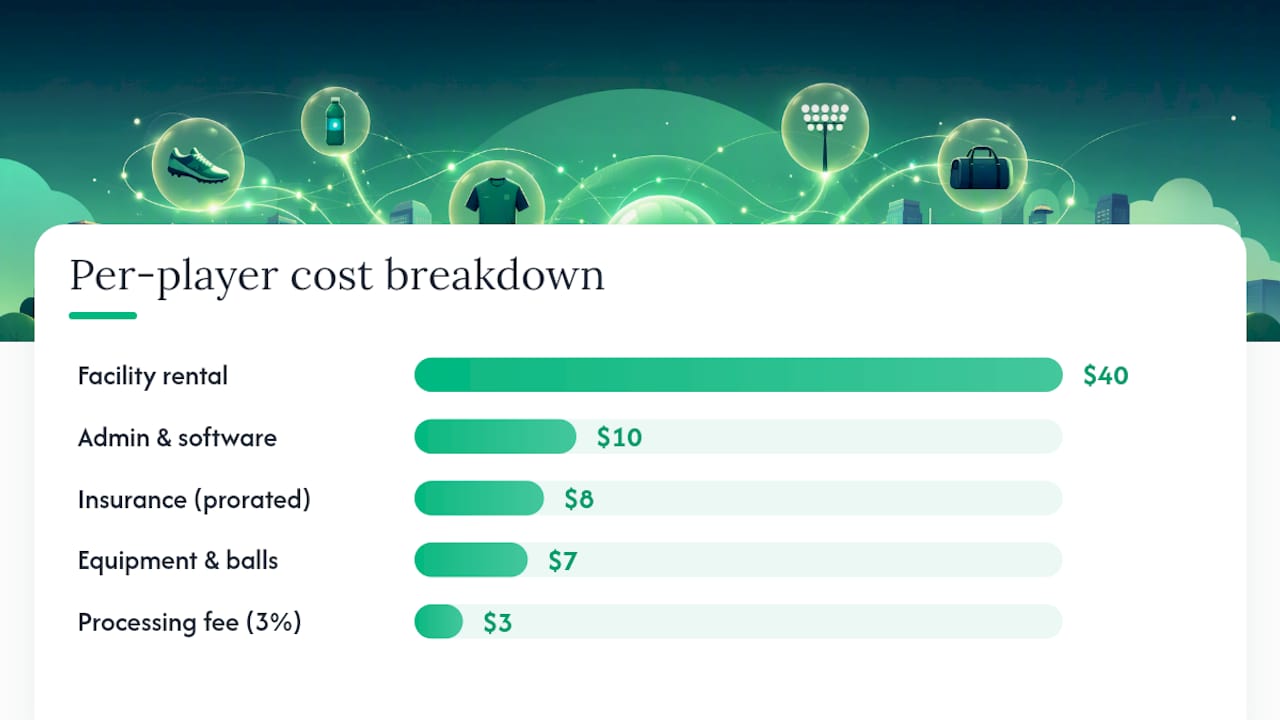
Set your registration fee above that floor. A $90 fee at 60 players generates $22 per player in margin for reserves, scholarships, or equipment replacement.
Transaction fee math at common registration amounts:
- $50 registration: ~$1.65 in fees at 3.3% = $48.35 net
- $150 registration: ~$4.95 in fees = $145.05 net
- $600 registration: ~$19.80 in fees = $580.20 net
At higher amounts, passing fees through as a visible line item is worth the conversation. At $50, absorbing them is cleaner.
Pro Tip: Build your fee math in a spreadsheet before you set prices. A league that charges $75 but nets $68 after fees has no reserve for a rainout or a refund wave.
Your 30-day launch timeline and pre-launch checklist
Week 4 before season start (policy and staffing):
- Finalize payment policy (methods, installments, refund rules)
- Assign registrar, finance owner, coach liaison, communications lead
- Confirm bank account for Stripe deposits
Week 3 (tech setup):
- Connect Stripe and verify routing
- Configure checkout options (card, ACH, onsite toggle)
- Set installment schedule and deposit amounts
- Create discount and scholarship codes
- Link waivers to registration flow
- Run test registration and test refund
Week 2 (marketing and open registration):
- Post payment policy on registration page and in confirmation email template
- Open registration with payment required
- Schedule automated payment reminders
Week 1 (reconciliation and roster finalization):
- Run first weekly reconciliation
- Follow up on any outstanding balances
- Confirm roster is complete and paid before first game
Pre-launch checklist (copy/paste ready):
- [ ] Payment policy posted publicly
- [ ] Stripe connected and verified
- [ ] Test transaction completed and refunded
- [ ] Installment schedule configured
- [ ] Scholarship codes created and distributed privately
- [ ] Automated reminders scheduled
- [ ] Staff roles assigned and documented
- [ ] Confirmation email template includes payment policy
Pro Tip: Run the complete pickleball league setup guide alongside this checklist. The operational steps map directly to what you configure in your league software.
What running city leagues actually teaches you
The most common mistake I see is also the most preventable: collecting payments through a personal Venmo or a shared PayPal account because it felt faster to set up. It isn’t faster. It creates reconciliation gaps, risks account freezes, and gives you no audit trail when a parent disputes a charge six weeks later.
The second most common mistake is delaying reconciliation. “We’ll sort it out at the end of the season” is how leagues end up with 12 unpaid registrants on a 40-person roster and no clear record of who owes what.
The fixes are not complicated. Require payment at signup. Automate reminders. Assign one person to own reconciliation and give them a documented process. Platforms like Flexleagueplus — with Stripe integration, DUPR approval, and registration tied directly to payment records — exist precisely because these operational problems are universal and solvable. The technology is not the hard part. The hard part is making the policy decisions before registration opens and sticking to them.
Flexleagueplus handles city league payments end to end
City parks departments and facility operators running pickleball leagues need one system where registration, payment, and roster records are the same transaction. Flexleagueplus delivers that: Stripe-powered payments, DUPR integration, and a league setup panel where you configure installments, discount codes, and checkout options without a developer.
Key features that map directly to this guide:
- Stripe-powered card and ACH payment collection at registration
- Installment and deposit configuration built into league setup
- Discount codes and scholarship codes applied automatically at checkout
- Automated receipts and payment reminders
- DUPR-approved score reporting and division management
- Registration tied to roster records so reconciliation is automatic
If you’re evaluating options, the league software comparison shows how Flexleagueplus positions against other platforms. Ready to set up payments for your next season? Visit Flexleagueplus to connect Stripe and open registration today.
Sources
The sources below informed this guide and are worth bookmarking for ongoing operations.
This article is general information, not a substitute for advice from a qualified financial advisor. Consult a qualified financial professional about your own circumstances before acting on anything here.